Showing posts with label cursor sharing. Show all posts

Friday, October 04, 2024

Cursor Sharing in Scheduled Processes: 4. How to Identify Candidate Processes for Cursor Sharing

This is the last in a series of 4 posts about the selective use of cursor sharing in scheduled processes in PeopleSoft.

In this article, I look at a method to identify candidate processes for cursor sharing.  Then it is necessary to test whether cursor sharing actually is beneficial.

My example is based on nVision reports in a PeopleSoft Financials system, but the technique can be applied to other processes and is not even limited to PeopleSoft.  nVision reports example because they vary from report to report, depending upon how they are written, and the nature of the reporting trees they use.  Some nVision reports benefit from cursor sharing, others it makes little difference, and for some it is detrimental.

As always Active Session History (ASH) is your friend.  First, you need to know which ASH data relates to which process, so you need to enable PeopleSoft instrumentation (see Effective PeopleSoft Performance Monitoring), and install my psftapi package and trigger to enable instrumentation of Cobol, nVision and SQR.

Candidates for Cursor Sharing

Use ASH for a given process to identify candidate processes by calculating the following measures.
  • Elapsed time of the process from the first to the last ASH sample.  This is not the elapsed duration of the client process, but it will be a reasonable approximation. Otherwise, you can get the exact duration from the process request record (PSPRCSRQST).
  • Total database time for a process (all ASH samples).
  • Total time that a process is restrained by the resource manager (where EVENT is 'resmgr: CPU quantum')
  • Total database time spent on CPU (where EVENT is null).
  • Total database time spent on SQL parse (where IN_PARSE flag is set to Y)
  • Number of distinct SQL IDs.
  • Number of distinct force matching signatures.
Look for processes with high elapsed time, of which a significant proportion is spent on both CPU and SQL parse.  This should correlate with processes where there are many more SQL IDs than force matching signatures.

Is Cursor Sharing Enabled Already?

It is possible to determine whether cursor sharing is already set for a process, although this is not explicitly recorded.  
  • If cursor sharing is not enabled then the number of distinct SQL_IDs should be greater than the number of distinct force-matching signatures. This may not be the case if you don't have enough ASH samples, but then the program probably doesn't consume enough time for it to be worth considering cursor sharing.
  • If the number of SQL_IDs is equal to the number of force matching signatures then cursor sharing is probably enabled, but again this could be unreliable if the number of ASH samples is low (and close to the number of SQL IDs).
  • It should be impossible for the number of distinct SQL IDs to be less than the number of distinct force matching signatures, but it can happen due to quirks in ASH sampling.
I have coded this into my queries.  It will be reasonably accurate if you have several ASH samples per SQL ID.  Otherwise, you may detect false positives.

Sample Queries and Output

I have written a couple of queries that I have published on GitHub.  They happen to be specific to nVision, but can easily be extended to other processes.
  • The first query calculates average values for each process/run control ID combination within the AWR retention period (high_parse_nvision_avg.sql)
Having implemented cursor sharing for a particular process it is necessary to watch it over time and decide whether the change has been effective. The metrics shown below come from a real system (although actual run control IDs have been changed).  
  • All the timings for NVS_RPTBOOK_1 have come down significantly. The number of SQL_IDs has dropped from 238 to 11.  The number of force matching signatures has also dropped, but that is because we have fewer ASH samples and some statements are no longer sampled at all.  Cursor sharing is beneficial and can be retained.
  • However, this is not the case for the second process. Although NVS_RPTBOOK_2 looked like a good candidate for cursor sharing, and the parse time has indeed come down, all the other durations have gone up.  The cursor sharing setting will have to be removed for this report.
                                            Cursor           Avg StdDev    Avg StdDev    Avg StdDev    Avg StdDev    Avg StdDev   Avg
                                    Cursor  Sharing   Num   Elap   Elap    ASH    ASH ResMgr ResMgr  Parse  Parse    CPU    CPU   SQL  Avg
OPRID      RUNCNTLID                Sharing Setting Procs   Secs   Secs   Secs   Secs   Secs   Secs   Secs   Secs   Secs   Secs   IDs  FMS
---------- ------------------------ ------- ------- ----- ------ ------ ------ ------ ------ ------ ------ ------ ------ ------ ----- ----
…
NVISION    NVS_RPTBOOK_1            EXACT   FORCE      33   3691   1062   2687   1071    741    702   2232    932   1791    479   238   16
                                    FORCE   FORCE      13   1623    377    664    394    357    373     43     19    353     85    11   12
…
           NVS_RPTBOOK_2            EXACT   EXACT      39   3696   1435   3316   1431   1038    927   1026    661   2042    611   137   27
                                    FORCE   EXACT       7   4028   2508   3676   2490   1333   1563     17     12   2275    939    19   19

It is always worth looking at individual process executions.  

We can see that cursor sharing was introduced on 31st July.  Even though there is a lot of variance in runtimes due to variances in data volumes and other system activities, it is clear that cursor sharing is beneficial for this process.

                                                                                                                                       Cursor
                              Process R                                              Elap    ASH ResMgr  Parse    CPU   SQL        ASH Sharing Cursor  Parse   S:F
OPRID      RUNCNTLID         Instance S  MIN_SAMPLE_TIME      MAX_SAMPLE_TIME        Secs   Secs   Secs   Secs   Secs   IDs  FMS  Samp Setting Sharing     % Ratio
---------- ---------------- --------- -- -------------------- -------------------- ------ ------ ------ ------ ------ ----- ---- ----- ------- ------- ----- -----
NVISION    NVS_RPTBOOK_1     12447036 9  21.07.2024 21.03.25  21.07.2024 21.47.02    2645   1543    174   1297   1277   145   17   150 FORCE   EXACT      84   8.5
                             12452568 9  22.07.2024 21.02.04  22.07.2024 21.41.03    2373   1413    123   1188   1250   133   13   138 FORCE   EXACT      84  10.2
                             12458455 9  23.07.2024 21.07.15  23.07.2024 21.52.25    2759   1587     51   1372   1423   152   14   155 FORCE   EXACT      86  10.9
                             12465042 9  24.07.2024 20.58.08  24.07.2024 21.50.19    3154   2100    369   1782   1557   201   18   205 FORCE   EXACT      85  11.2
                             12471732 9  25.07.2024 21.25.34  25.07.2024 22.46.32    4885   3861   1946   3318   1843   333   14   377 FORCE   EXACT      86  23.8
                             12477118 9  26.07.2024 22.41.07  26.07.2024 23.26.07    2730   1791    113   1526   1586   173   14   174 FORCE   EXACT      85  12.4
                             12479163 9  27.07.2024 23.13.40  28.07.2024 00.01.23    2917   1688    161   1513   1260   156   14   164 FORCE   EXACT      90  11.1
                             12480710 9  28.07.2024 21.47.44  28.07.2024 22.29.08    2529   1586    205   1320   1238   149   12   154 FORCE   EXACT      83  12.4
                             12487744 9  29.07.2024 21.47.44  29.07.2024 22.51.05    3834   2815    797   2292   1843   248   16   273 FORCE   EXACT      81  15.5
                             12495417 9  30.07.2024 22.57.13  30.07.2024 23.46.48    3015   2084    307   1869   1592   200   15   203 FORCE   EXACT      90  13.3
…
                             12501446 9  31.07.2024 21.27.51  31.07.2024 21.51.18    1478    461     72     31    389    10   11    45 FORCE   FORCE       7   0.9
                             12507769 9  01.08.2024 21.44.01  01.08.2024 22.05.56    1387    357    100     21    246     7    8    34 FORCE   FORCE       6   0.9
                             12513527 9  02.08.2024 21.02.27  02.08.2024 21.27.47    1538    635    236     31    400    11   12    62 FORCE   FORCE       5   0.9
                             12515368 9  03.08.2024 22.12.50  03.08.2024 22.40.03    1682    686    143     51    532     9   10    67 FORCE   FORCE       7   0.9
                             12516959 9  04.08.2024 21.38.01  04.08.2024 21.57.00    1263    266            51    266     8    9    26 FORCE   FORCE      19   0.9
                             12522863 9  05.08.2024 21.14.36  05.08.2024 21.48.40    2082   1167    727     51    430    14   13   114 FORCE   EXACT       4   1.1
                             12529263 9  06.08.2024 21.02.59  06.08.2024 21.39.47    2223   1300    900     51    389    12   13   126 FORCE   FORCE       4   0.9
                             12535782 9  07.08.2024 21.08.23  07.08.2024 21.37.48    1774    974    585     52    379    12   13    94 FORCE   FORCE       5   0.9
                             12541727 9  08.08.2024 21.07.43  08.08.2024 21.40.54    2014   1085    809     51    276    16   17   106 FORCE   FORCE       5   0.9
                             12547232 9  09.08.2024 21.27.28  09.08.2024 21.47.08    1213    236            31    236     8    9    23 FORCE   FORCE      13   0.9
…
Note that on 5th August the report erroneously claims that cursor sharing went back to EXACT.  This is because there are more SQL_IDs than force matching signatures.  Again, this is a quirk of ASH sampling. 

Wednesday, October 02, 2024

Cursor Sharing in Scheduled Processes: 3. How to Set Initialisation Parameters for Specific Scheduled Processes

This is the third in a series of 4 posts about the selective use of cursor sharing in scheduled processes in PeopleSoft.

  1. Introduction
  2. What happens during SQL Parse?  What is a 'hard' parse?  What is a 'soft' parse?  The additional overhead of a hard parse.
  3. How to set CURSOR_SHARING for specific scheduled processes
  4. How to identify candidate processes for cursor sharing.

Cursor Sharing

If you cannot remove the literal values in the application SQL code, then another option is to enable cursor sharing and have Oracle do it.  Literals are converted to bind variables before the SQL is parsed; thus, statements that only differ in the literal values can be treated as the same statement.  If the statement is still in the shared pool, it is not fully reparsed and uses the same execution plan.

Oracle cautions against using cursor sharing as a long-term fix: "The best practice is to write sharable SQL and use the default of EXACT for CURSOR_SHARING… FORCE is not meant to be a permanent development solution."

I realise that I am now about to suggest doing exactly that, but only for specific processes, and never for the whole database.  Over the years, I have tested enabling cursor sharing at database level a few times and have never had a good experience.  

However, enabling cursor sharing in a few carefully selected processes can be beneficial.  It can save some of the time spent in the database on hard parse, but will have no effect on the time that PeopleSoft processes spend generating the SQL.

Session Settings for Processes Executed on the Process Scheduler 

Setting a session for a specific process run on the PeopleSoft process scheduler is straightforward.   The first thing a process does is set the status of its own request record to 7, indicating that it is processing. A database trigger can be created on this transition that will then be executed in the session of the process.  
I initially used this technique to set other session settings for nVision reports.  I used a table to hold a list of the settings, and the trigger matches this metadata to the processes being run by up to 4 attributes: process type, process name, operation and run control.
It is usual to set up different run controls to run different instances of the same code on different sets of data.  I sometimes see certain run controls set up to regularly run certain nVision or other reports.
CREATE OR REPLACE TRIGGER sysadm.set_prcs_sess_parm
BEFORE UPDATE OF runstatus ON sysadm.psprcsrqst
FOR EACH ROW
FOLLOWS sysadm.psftapi_store_prcsinstance 
WHEN (new.runstatus = 7 AND old.runstatus != 7 AND new.prcstype != 'PSJob')
DECLARE
  l_cmd VARCHAR2(100 CHAR);
…
BEGIN
  FOR i IN (
    WITH x as (
      SELECT p.*
      ,      row_number() over (partition by param_name 
             order by NULLIF(prcstype, ' ') nulls last, NULLIF(prcsname, ' ') nulls last, 
                      NULLIF(oprid   , ' ') nulls last, NULLIF(runcntlid,' ') nulls last) priority
      FROM   sysadm.PS_PRCS_SESS_PARM p
      WHERE  (p.prcstype  = :new.prcstype  OR p.prcstype  = ' ')
      AND    (p.prcsname  = :new.prcsname  OR p.prcsname  = ' ')
      AND    (p.oprid     = :new.oprid     OR p.oprid     = ' ')
      AND    (p.runcntlid = :new.runcntlid OR p.runcntlid = ' ')) 
    SELECT * FROM x WHERE priority = 1 
  ) LOOP
…
    IF NULLIF(i.parmvalue,' ') IS NOT NULL THEN
      l_cmd := 'ALTER SESSION '||i.keyword||' '||l_delim||i.param_name||l_delim||l_op||i.parmvalue;
      EXECUTE IMMEDIATE l_cmd;
    END IF;
  END LOOP;
EXCEPTION
  WHEN OTHERS THEN …
END;
/
The first delivered program that was a candidate for cursor sharing was GLPOCONS (GL Consolidations process).  It is only necessary is to insert the corresponding metadata, and it will apply the next time the process starts.  Anything you can set with an ALTER SESSION command can be put in the metadata.  
At times, other settings have been defined, hence in this example the insert statement is written in this way, and you can also see that in-memory query has been disabled for the same process. 
INSERT INTO sysadm.ps_prcs_sess_parm (prcstype, prcsname, oprid, runcntlid, keyword, param_name, parmvalue)
with x as (
          select 'inmemory_query' param_name, 'SET' keyword, 'DISABLE' parmvalue from dual --Disable inmemory 
union all select 'cursor_sharing'           , 'SET' keyword, 'FORCE'             from dual --to mitigate excessive parse
), y as (
  select prcstype, prcsname, ' ' oprid, ' ' runcntlid
  from	 ps_prcsdefn
  where  prcsname IN('GLPOCONS')
)
select  y.prcstype, y.prcsname, y.oprid, y.runcntlid, x.keyword, x.param_name, x.parmvalue
from    x,y
/

Stand-alone Application Engine (PSAE) -v- Application Engine Server PSAESRV

In PeopleTools 8.4, the Process Scheduler became a fully-fledged Tuxedo domain and the Application Engine server process PSAESRV was also introduced.  Stand-alone Application Engine executable psae is still available, but the Tuxedo server process is configured by default.  The Tuxedo server process is a persistent process that creates a persistent database connection that may service many different Application Engine programs during its lifetime.  If you make session settings during the execution of one Application Engine program, they will still be set when the same server process executes the next program. Generally, you don't want session settings bleeding from one process request to another.  Instead, any setting made at the start of the process would have to be reverted to the previous value at the end.  That is not necessarily the same as resetting it back to the default.
This is, therefore, another reason why it is preferable to revert to using the legacy stand-alone Application Engine process (psae) that creates a new database session for each request.
The set_prcs_sess_parm  trigger does not save or reset the previous value for settings it makes. Therefore, it should NOT be used in conjunction with PSAESRV.

Cursor Sharing Application Engine Programs Spawned Directly by COBOL Programs

In PeopleSoft, some COBOL programs directly spawn stand-alone Application Engine processes.  These processes do not update the status on the process request record, so the set_prcs_sess_parm trigger described above does not fire.  
A different data change must be found upon which to place a trigger.  It may be different for different processes.  In Financials, GL_JEDIT2 is such a process, and it is a good candidate for cursor sharing.  
I chose to create a hard-coded compound trigger on the insert into the journal line table (PS_JRNL_LN).  
  • See gfc_jrnl_ln_gl_jedit2_trigger.sql
  • This update is specific to this process, so the trigger is simply hard-coded. It does not use any metadata.
  • The after row part of the trigger copies the process instance number from the JRNL_LN rows being inserted into a local variable. This is deliberately minimal so that overhead on the insert is minimal
  • The after statement part of the trigger cannot be directly read from the table that was updated.  Instead, it checks that the process instance number, that was captured during the after row section and stored in the local variable, is for an instance of FSPCCURR or GLPOCONS that is currently processing (PSPRCSRQST.RUNSTATUS = '7').  If so it sets CURSOR_SHARING to FORCE at session level.  
  • The ALTER SESSION command is Data Dictionary Language (DDL).  In PL/SQL this must be executed as dynamic code.
  • The FSPCCURR and GLPOCONS COBOL processes may each spawn GL_JEDIT2 many times. Each runs as a separate stand-alone PSAE process that makes a new connection to the database, runs and then disconnects.  Cursor sharing is enabled separately for each.
REM gfc_jrnl_ln_gl_jedit2_trigger.sql
CREATE OR REPLACE TRIGGER gfc_jrnl_ln_gl_jedit2
FOR UPDATE OF process_instance ON ps_jrnl_ln
WHEN (new.process_instance != 0 and old.process_instance = 0)
COMPOUND TRIGGER
  l_process_instance INTEGER;
  l_runcntlid VARCHAR2(30);
  l_module VARCHAR2(64);
  l_action VARCHAR2(64);
  l_prcsname VARCHAR2(12);
  l_cursor_sharing CONSTANT VARCHAR2(64) := 'ALTER SESSION SET cursor_sharing=FORCE';

  AFTER EACH ROW IS 
  BEGIN
    l_process_instance := :new.process_instance;
  END AFTER EACH ROW;
  
  AFTER STATEMENT IS 
  BEGIN
    IF l_process_instance != 0 THEN
      dbms_application_info.read_module(l_module,l_action);
      IF l_module like 'PSAE.GL_JEDIT2.%' THEN --check this session is instrumented as being GL_JEDIT2
        --check process instance being set is a running FSPCCURR process
        SELECT prcsname, runcntlid
        INTO l_prcsname, l_runcntlid
        FROM psprcsrqst
        WHERE prcsinstance = l_process_instance
        AND prcsname IN('FSPCCURR','GLPOCONS')
        AND runstatus = '7';
        
        l_module := regexp_substr(l_module,'PSAE\.GL_JEDIT2\.[0-9]+',1,1)
                    ||':'||l_prcsname||':PI='||l_process_instance||':'||l_runcntlid;
        dbms_application_info.set_module(l_module,l_action);
        EXECUTE IMMEDIATE l_cursor_sharing;
      END IF;
    END IF;
  EXCEPTION 
    WHEN NO_DATA_FOUND THEN 
      NULL; --cannot find running fspccurr/glpocons with this process instance number
    WHEN OTHERS THEN
      NULL;
  END AFTER STATEMENT;

END gfc_jrnl_ln_gl_jedit2;
/

Tuesday, October 01, 2024

Cursor Sharing in Scheduled Processes: 2. What happens during SQL Parse? What is a 'hard' parse? What is a 'soft' parse?

This is the second in a series of 4 posts about the selective use of cursor sharing in scheduled processes in PeopleSoft.

  1. Introduction
  2. What happens during SQL Parse?  What is a 'hard' parse?  What is a 'soft' parse?  The additional overhead of a hard parse.
  3. How to set CURSOR_SHARING for specific scheduled processes.
  4. How to identify candidate processes for cursor sharing.

To understand why cursor sharing can be beneficial it is necessary to understand

  • What happens when Oracle parses and executes a SQL statement?.
  • How some PeopleSoft processes dynamically construct SQL statements

SQL Processing: 'Hard' Parse -v- 'Soft' Parse

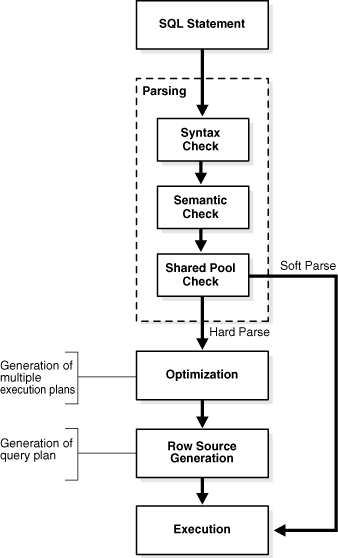
Oracle SQL Parse Flow
SQL parse processing is set out in various places in the Oracle database documentation
When a statement is submitted to the database it goes through a number of stages of parsing before it is executed. 
  • Syntax Check: Is the statement syntactically valid?
  • Semantic Check:  Is the statement meaningful?  Do the referenced objects exist and is the user allowed to access them?
  • SGA Check: Does the statement already exist in the shared SQL area?  
The database looks for an exact matching statement in the shared SQL area. If it is not found, the database must perform additional tasks called 'hard' parsing.  The stages performed up to this point are referred to as 'soft parsing'.
  • Generation of the optimal execution plan
  • Row Source Generation - The execution plan is used to generate an iterative execution plan that is usable by the rest of the database.
Thus the Oracle Database must perform a 'hard' parse at least once for every unique DML statement.

What is Cursor Sharing?

A cursor is a name or handle for a private SQL area that contains session-specific information about a statement, including bind variables, state information and result sets.  A cursor in the private area points to the shared SQL area in the library cache that contains the parse tree and execution plan for a statement.  Multiple private areas can reference a single shared SQL area.  This is known as cursor sharing.

The database allows only textually identical statements to share a cursor. By default, the CURSOR_SHARING parameter is set to EXACT, and thus is disabled.  "The optimizer generates a plan for each statement based on the literal value."
When CURSOR_SHARING is set to FORCE, the database replaces literal values with system-generated variables.  The database still only exactly matches statements, but after the literal values have been substituted, thus giving the appearance of matching statements that differ only by their literal values.  "For statements that are identical after bind variables replace the literals, the optimizer uses the same plan. Using this technique, the database can sometimes reduce the number of parent cursors in the shared SQL area." The database only performs a soft parse.  
In systems, such as PeopleSoft, that generate many distinct statements, cursor sharing can significantly reduce hard parse, and therefore CPU and time spent on it.

Sources of Hard Parse in PeopleSoft

PeopleSoft has a deserved reputation for suffering from high volumes of SQL hard parse.  Generally, the cause of this is dynamically generated code.  Often each statement has different literal values. 
  • In Application Engine, %BIND() resolves to a literal value rather than bind variable in the resulting SQL statement unless the ReUseStatement attribute is enabled.  The problem is that it is disabled by default, and there are limitations to when it can be set.
  • Dynamic statements in COBOL processes.  This is effectively the same behaviour as Application Engine, but here the dynamic generation of SQL is hard-coded in the COBOL from a combination of static fragments and configuration data. PeopleSoft COBOL programs generally just embed literal values in such statements because it is easier than creating dynamic SQL statements with possibly varying numbers of bind variables.
  • In nVision where 'dynamic selectors' and 'use literal values' tree performance options are selected.  These settings are often preferable because the resulting SQL statements can make effective use of Bloom filters and Hybrid Column Compression (on Exadata).  The penalty is that it can lead to more hard parse operations.

ReUseStatement -v- Cursor  Sharing

Of course, it would be better if PeopleSoft SQL used bind variables more often, rather than literal values. 
In Application Engine, if the ReUseStatement attribute is set on a step, then bind variables in Application Engine remain bind variables in the resulting SQL and are not converted back to literals.  
This can reduce both the amount of time Application Engine spends dynamically generating SQL statements before submitting them to the database as well as the time the database spends parsing them (see Minimising Parse Time in Application Engine with ReUseStatement). 
However, this attribute is not set by default on newly created Application Engine steps in Application Designer.  This was to maintain backward compatibility with programs created in earlier versions of PeopleTools.
However, there are restrictions to where it cannot be used.  Most commonly because %BIND(…NOQUOTES) has been used to dynamically generate part of the statement based on configuration data.
Over the years, PeopleSoft development has got much better at setting this attribute where possible in the delivered application code.  Nonetheless, there are still places where it could be added.  
See also:
However, there are some considerations before we add it ourselves.
  • ReUseStatement cannot be introduced across the board, but only on steps that meet certain criteria set out in the documentation.  It doesn't work when dynamic code is generated with %BIND(…,NOQUOTES), or if a %BIND() is used in a SELECT clause.  Worse, setting this attribute incorrectly can cause the application to function incorrectly.  So each change has to be tested carefully.
  • When a customer sets the ReUseStatement attribute in the delivered code, it is a customisation to an Application Engine step that has to be migrated using Application Designer.  It then has to be maintained to ensure that subsequent PeopleSoft releases and patches do not revert it.
  • There is no equivalent option for PeopleSoft COBOL, SQR, or nVision.  The way that SQL is generated in each is effectively hard-coded.

Recommendation: It is not a case of either ReUseStatement or Cursor Sharing.  It may be both.  If you are writing your own Application Engine code, or customising delivered code anyway, then it is usually advantageous to set ReUseStatement where you can.  You will save non-database execution time as well as database time because you are then using bind variables, and Application Engine does not have to spend time generating the text of a new SQL statement with new literal values for every execution.  You may still benefit from cursor sharing for statements where you cannot set ReUseStatement.  

However, as you will see in the last article in this series, cursor sharing is not always effective, you have to test.

Monday, September 30, 2024

Cursor Sharing in Scheduled Processes: 1. Introduction

This is the first in a series of 4 posts about the selective use of cursor sharing in scheduled processes in PeopleSoft.

  1. Introduction
  2. What happens during SQL Parse?  What is a 'hard' parse?  What is a 'soft' parse?  The additional overhead of a hard parse.
  3. How to set CURSOR_SHARING for specific scheduled processes.
  4. How to identify candidate processes for cursor sharing.

PeopleSoft applications make extensive use of configuration data that is then interpreted by dynamic code. This leads to lots of similar statements with different literal values; statements that differ only by literal values are still different. In an Oracle database, each statement that cannot be exactly matched with a statement already in the Shared SQL Area (also known as the Cursor Cache) must be parsed.  Thus, each distinct statement must be parsed at least once.  
Hence, PeopleSoft systems have many SQL statements that are only ever executed once,each of which has to be fully parsed.  This is often called a 'hard' parse.  With PeopleSoft, this parse overhead can have a significant impact on performance.
In an Oracle database, CURSOR_SHARING can be set to FORCE (the default is EXACT). Then, it will substitute the literals with system-generated bind variables. The statement is still exactly matched against the contents of the Shared SQL Area, but now statements that previously only differed by their literal values will match the same bind variables.  Oracle can omit some of the parse processing for matched statements, leaving what is often called a 'soft' parse. This can significantly reduce the CPU overhead of SQL parse, and thus improve the performance of some processes.

Do not set CURSOR_SHARING to FORCE at database level.  Over the years, I have tried this several times with different PeopleSoft systems, and on various different versions of Oracle.  The net result was always negative. Some things improved, but many more degraded and often to a greater extent.

However, I have found that it can be effective to set it at session-level for specific processes, and sometimes just specific run controls for specific processes.  

What is Oracle's advice?

Oracle has always been clear that it is always better to write sharable SQL (i.e. that uses bind variables), and that setting CURSOR_SHARING = FORCE should not be used as a permanent fix.
As a general guideline, the Oracle Real-World Performance group recommends against setting CURSOR_SHARING to FORCE except … when all of the following conditions are met:
  1. Statements in the shared pool differ only in the values of literals 
  2. Response time is suboptimal because of a very high number of library cache misses.
  3. Your existing code has a serious security and scalability bug—the absence of bind variables—and you need a temporary band-aid until the source code can be fixed.
  4. You set this initialization parameter at the session level and not at the instance level.
See SQL Tuning Guide: Improving Real-World Performance Through Cursor Sharing -> Real-World Performance Guidelines for Cursor Sharing -> Do Not Use CURSOR_SHARING = FORCE as a Permanent Fix

I submit that my approach in PeopleSoft meets at least 3 these of conditions.  As for the third criterion, we are talking about SQL statements that are either delivered as part of PeopleSoft code or that are dynamically generated from configuration data, also by delivered code.  The reality is that these are as 'fixed' as they are going to be within PeopleSoft.  Most of this code is at least very difficult, if not impossible, for the customer to alter, and the cost and risk of owning and maintaining any such customisation is almost certainly prohibitive.  Cursor sharing may be a band-aid, but it will be there for the long term.

The next article looks at how the Oracle database parses SQL statements.

Wednesday, May 08, 2019

PeopleSoft Administrator Podcast: #183 – Effective Performance Monitoring

I recently recorded a podcast with Dan Iverson and Kyle Benson for the PeopleSoft Administrator Podcast, this time about instrumentation, monitoring the performance of PeopleSoft system, and Performance Monitor.  There is also just a little about cursor sharing.

(3 May 2019) #183 – Effective Performance Monitoring

You can listen to the podcast on psadmin.io, or subscribe with your favourite podcast player, or in iTunes.

Friday, March 02, 2018

Setting Oracle Session Parameters for Specific Process Scheduler Processes

This note describes a mechanism for setting initialisation parameters for specific processes run on the process scheduler. I will demonstrate its relation to nVision, but it has general application in PeopleSoft.  I have also used it to set cursor sharing in certain processes.
A table is used to hold metadata that describes what setting is applied to which processes. A trigger on the process scheduler request table PSPRCSRQST reads that data and alters the session setting. This approach is easier to adjust and understand than static PL/SQL code in a trigger.
NB: The PSAESRV server process is used to run application engine programs in the process scheduler by default.  It should only be used for very short-lived programs and should usually be deconfigured. It maintains a persistent connection to the database. Therefore, session parameters set for one application engine program will carry forward into subsequent programs run on the same server process with the potential for unintended and unpredictable results. Other processes all establish their own database session that ends when the process terminates. This trigger mechanism can be still used to set parameters for some processes that run on PSAESRV, but the default parameter value should then be set for all other application engine processes. 

Metadata 

The table that holds the metadata should be defined in Application Designer.
CREATE TABLE PS_PRCS_SESS_PARM (PRCSTYPE VARCHAR2(30) NOT NULL,
   PRCSNAME VARCHAR2(12) NOT NULL,
   OPRID VARCHAR2(30) NOT NULL,
   RUNCNTLID VARCHAR2(30) NOT NULL,
   KEYWORD VARCHAR2(8) NOT NULL,
   PARAM_NAME VARCHAR2(50) NOT NULL,
   PARMVALUE VARCHAR2(128) NOT NULL) TABLESPACE PTTBL STORAGE (INITIAL
 40000 NEXT 100000 MAXEXTENTS UNLIMITED PCTINCREASE 0) PCTFREE 10
 PCTUSED 80
/
CREATE UNIQUE  iNDEX PS_PRCS_SESS_PARM ON PS_PRCS_SESS_PARM (PRCSTYPE,
   PRCSNAME,
   OPRID,
   RUNCNTLID,
   PARAM_NAME) TABLESPACE PSINDEX STORAGE (INITIAL 40000 NEXT 100000
 MAXEXTENTS UNLIMITED PCTINCREASE 0) PCTFREE 10 PARALLEL NOLOGGING
/
ALTER INDEX PS_PRCS_SESS_PARM NOPARALLEL LOGGING
/
I will demonstrate this mechanism with nVision, but it could be applied to any process. The metadata is simply inserted into the table by script.
INSERT INTO sysadm.PS_PRCS_SESS_PARM (prcstype, prcsname, oprid, runcntlid, keyword, param_name, parmvalue)
VALUES ('nVision-ReportBook','RPTBOOK',' ',' ', 'SET', 'parallel_degree_policy','auto');
INSERT INTO sysadm.PS_PRCS_SESS_PARM (prcstype, prcsname, oprid, runcntlid, keyword, param_name, parmvalue)
VALUES ('nVision-ReportBook','RPTBOOK',' ',' ', 'SET', 'parallel_degree_limit','4');
INSERT INTO sysadm.PS_PRCS_SESS_PARM (prcstype, prcsname, oprid, runcntlid, keyword, param_name, parmvalue)
VALUES ('nVision-ReportBook','RPTBOOK',' ',' ', 'SET', 'parallel_degree_level','150');
INSERT INTO sysadm.PS_PRCS_SESS_PARM (prcstype, prcsname, oprid, runcntlid, keyword, param_name, parmvalue)
VALUES ('nVision-ReportBook','RPTBOOK',' ',' ', 'SET', 'parallel_min_time_threshold','1');
INSERT INTO sysadm.PS_PRCS_SESS_PARM (prcstype, prcsname, oprid, runcntlid, keyword, param_name, parmvalue)
VALUES ('nVision-ReportBook','RPTBOOK',' ',' ', 'SET', '_optimizer_skip_scan_enabled','FALSE');
Here we have 5 session parameters that will apply to all nVision reportbooks, but that I don't want to apply to the rest of the system.
PRCSTYPE             PRCSNAME     OPRID      RUNCNTLID                KEYWORD  PARAM_NAME                  PARMVALUE
-------------------- ------------ ---------- ------------------------ -------- ------------------------------ --------------------
nVision-ReportBook   RPTBOOK                                          SET      parallel_degree_policy         auto
nVision-ReportBook   RPTBOOK                                          SET      parallel_degree_limit          4
nVision-ReportBook   RPTBOOK                                          SET      _optimizer_skip_scan_enabled   FALSE
nVision-ReportBook   RPTBOOK                                          SET      parallel_min_time_threshold    1
nVision-ReportBook   RPTBOOK                                          SET      parallel_degree_level          150
The objective is to use limited parallelism only in the nVision reporting, and without decorating underlying ledger tables
  • parallel_degree_policy=auto enables the new 12c automatic degree of parallel calculation, statement queuing. 
  • parallel_min_time_threshold is set to 1 second. The default is 10. Statements whose runtime is estimated to be greater than or equal to this value will be considered for automatic degree of parallelism. 
  • parallel_degree_limit=4 restricts the automatic degree of parallelism to 4 to prevent any one statement using excessive parallelism.
  • parallel_degree_level=150 scales the automatic degree of parallelism calculation but within the parallel_degree_limit. This parameter is not officially documented, but See Kerry Osborne's blog 12c – parallel_degree_level (control for auto DOP).   
  • _optimiser_skip_scan_enabled=FALSE disables index skip scan to promote the use of smart full scan and Bloom filtering. It is recommended for engineered systems in Advice for the PeopleSoft DBA. Skip scan can prevent the optimizer from choosing a smart full scan, so it makes sense to limit the setting to just nVision. I can also specify a parameter that will only be set when the reportbook is run by a particular operator with a particular run control.
The specific setting for one particular operator ID and run control takes precedence over the generic setting for all reportbooks.
INSERT INTO sysadm.PS_PRCS_SESS_PARM (prcstype, prcsname, oprid, runcntlid, keyword, param_name, parmvalue) 
VALUES ('nVision-ReportBook','RPTBOOK','NVOPR','NVSRBK_2', 'SET', 'parallel_degree_level','200');
In this case, I will scale the degree of parallelism further for a particular reportbook by setting parallel degree level to 20.
PRCSTYPE             PRCSNAME     OPRID      RUNCNTLID                KEYWORD  PARAM_NAME                  PARMVALUE
-------------------- ------------ ---------- ------------------------ -------- ------------------------------ --------------------
…
nVision-ReportBook   RPTBOOK                                          SET      parallel_degree_level          150
nVision-ReportBook   RPTBOOK      NVOPR      NVSRBK_2                 SET      parallel_degree_level          200

Trigger 

When a process starts the first thing it does is update its own status to 7 to indicate that it is processing. This is another example of a trigger created on that transition that injects behaviour at the start of a PeopleSoft process. This trigger reads the metadata and applies the settings with an ALTER SESSION command. The process type, name, operation and run control attributes must exactly match the process request, but a blank space is treated as a wildcard. Underscore parameters must be delimited in double-quotes.
CREATE OR REPLACE TRIGGER sysadm.set_prcs_sess_parm
BEFORE UPDATE OF runstatus ON sysadm.psprcsrqst
FOR EACH ROW
WHEN (new.runstatus = 7 AND old.runstatus != 7 AND new.prcstype != 'PSJob')
DECLARE
  l_cmd VARCHAR2(100 CHAR);
  l_delim VARCHAR2(1 CHAR) := '';
  l_op VARCHAR2(1 CHAR) := '=';
BEGIN
  dbms_output.put_line('Row:'||:new.prcstype||'.'||:new.prcsname||':'||:new.oprid||'.'||:new.runcntlid);

  FOR i IN (
    WITH x as (
      SELECT p.*
      ,      row_number() over (partition by param_name 
                               order by NULLIF(prcstype, ' ') nulls last,
                                        NULLIF(prcsname, ' ') nulls last,
                                        NULLIF(oprid, ' ') nulls last,
                                        NULLIF(runcntlid,' ') nulls last
                              ) priority
      FROM   sysadm.PS_PRCS_SESS_PARM p
      WHERE  (p.prcstype  = :new.prcstype  OR p.prcstype  = ' ')
      AND    (p.prcsname  = :new.prcsname  OR p.prcsname  = ' ')
      AND    (p.oprid     = :new.oprid     OR p.oprid     = ' ')
      AND    (p.runcntlid = :new.runcntlid OR p.runcntlid = ' ')
    ) 
    SELECT * FROM x WHERE priority = 1 
  ) LOOP

    IF UPPER(i.keyword) = 'SET' THEN
      l_op := '=';
      IF SUBSTR(i.param_name,1,1) = '_' THEN 
        l_delim := '"';
      ELSE
        l_delim := '';
      END IF;   
    ELSE 
      l_op := ' ';
      l_delim := '';
    END IF;

    IF NULLIF(i.parmvalue,' ') IS NOT NULL THEN
      dbms_output.put_line('Rule:'||NVL(NULLIF(i.prcstype,' '),'*')
                             ||'.'||NVL(NULLIF(i.prcsname,' '),'*')
                             ||':'||NVL(NULLIF(i.oprid,' '),'*')
                             ||'.'||NVL(NULLIF(i.runcntlid,' '),'*')
                             ||':'||i.keyword||':'||i.param_name||l_op||i.parmvalue);

      l_cmd := 'ALTER SESSION '||i.keyword||' '||l_delim||i.param_name||l_delim||l_op||i.parmvalue;
      dbms_output.put_line('PI='||:new.prcsinstance||':'||:new.prcstype||'.'||:new.prcsname||':'
                                ||:new.oprid||'.'||:new.runcntlid||':'||l_cmd);
      EXECUTE IMMEDIATE l_cmd;
    END IF;
  END LOOP;
EXCEPTION
  WHEN OTHERS THEN
    dbms_output.put_line(sqlerrm);
END;
/
The trigger script set_prcs_sess_parm.sql can be downloaded from my miscellaneous PeopleSoft scripts repository on GitHub.

Testing 

The trigger can be tested by updating the process scheduler request table in SQL*Plus, but be careful to roll back the update afterwards rather than committing. The trigger writes debug information to the server output that can be seen in SQL*Plus showing the rule being used and the ALTER SESSION command generated. However, this output is not captured in any PeopleSoft log when the trigger is fired by a PeopleSoft process.
set serveroutput on 
update psprcsrqst set runstatus = 7 where runstatus != 7
and prcsname = 'RPTBOOK' and runcntlid = 'NVSRBK_2' and oprid = 'NVOPR' and rownum = 1;
rollback;

Rule:nVision-ReportBook.RPTBOOK:*.*:_optimizer_skip_scan_enabled=FALSE
PI=3543986:nVision-ReportBook.RPTBOOK:NVOPR.NVSRBK_2:ALTER SESSION SET "_optimizer_skip_scan_enabled"=FALSE
Rule:nVision-ReportBook.RPTBOOK:NVOPR.NVSRBK_2:parallel_degree_level=200
PI=3543986:nVision-ReportBook.RPTBOOK:NVOPR.NVSRBK_2:ALTER SESSION SET parallel_degree_level=200
Rule:nVision-ReportBook.RPTBOOK:*.*:parallel_degree_limit=4
PI=3543986:nVision-ReportBook.RPTBOOK:NVOPR.NVSRBK_2:ALTER SESSION SET parallel_degree_limit=4
Rule:nVision-ReportBook.RPTBOOK:*.*:parallel_degree_policy=auto
PI=3543986:nVision-ReportBook.RPTBOOK:NVOPR.NVSRBK_2:ALTER SESSION SET parallel_degree_policy=auto
Rule:nVision-ReportBook.RPTBOOK:*.*:parallel_min_time_threshold=1
PI=3543986:nVision-ReportBook.RPTBOOK:NVOPR.NVSRBK_2:ALTER SESSION SET parallel_min_time_threshold=1
In the above example, the specific rule for NVSRBK_2 was applied setting PARALLEL_DEGREE_LEVEL to 200, whereas in the next example, the generic setting of 150 is applied to NVSRBK_1.
update psprcsrqst set runstatus = 7 where runstatus != 7
and prcsname = 'RPTBOOK' and runcntlid = 'NVSRBK_1' and oprid = 'NVOPR' and rownum = 1;
rollback;

Rule:nVision-ReportBook.RPTBOOK:*.*:_optimizer_skip_scan_enabled=FALSE
PI=3543964:nVision-ReportBook.RPTBOOK:NVOPR.NVSRBK_1:ALTER SESSION SET "_optimizer_skip_scan_enabled"=FALSE
Rule:nVision-ReportBook.RPTBOOK:*.*:parallel_degree_level=150
PI=3543964:nVision-ReportBook.RPTBOOK:NVOPR.NVSRBK_1:ALTER SESSION SET parallel_degree_level=150
Rule:nVision-ReportBook.RPTBOOK:*.*:parallel_degree_limit=4
PI=3543964:nVision-ReportBook.RPTBOOK:NVOPR.NVSRBK_1:ALTER SESSION SET parallel_degree_limit=4
Rule:nVision-ReportBook.RPTBOOK:*.*:parallel_degree_policy=auto
PI=3543964:nVision-ReportBook.RPTBOOK:NVOPR.NVSRBK_1:ALTER SESSION SET parallel_degree_policy=auto
Rule:nVision-ReportBook.RPTBOOK:*.*:parallel_min_time_threshold=1
PI=3543964:nVision-ReportBook.RPTBOOK:NVOPR.NVSRBK_1:ALTER SESSION SET parallel_min_time_threshold=1