Tuesday, September 20, 2022

No Execution Plan Survives Contact with the Optimizer Untransformed

One of the benefits of attending Oracle conferences is that by listening and talking to other people I get a different perspective on things. Sometimes, something gives me an idea or reminds me of the importance of something that I don't use often enough. I was talking with Neil Chandler about SQL Query Transformation. We came up with a variation of a well known quote:
It isn't completely accurate.  Not every query gets transformed, but it occurs commonly, it made a good title, and you are reading this blog!
During SQL parse, the optimizer can transform a SQL query into another SQL query that is functionally identical but that results in an execution plan with a lower cost (and therefore should execute more quickly). Sometimes, multiple transformations can be applied to a single statement. 
The Oracle documentation describes various forms of transformation. You can see in the execution plan that something has happened, but you can't see the transformed SQL statement directly. However, it can be obtained from the optimizer trace that can be enabled by setting event 10053.

Demonstration 

I am going to take a simple SQL query
set pages 99 lines 200 autotrace off
alter session set tracefile_identifier='no_unnest';
alter session set events '10053 trace name context forever, level 1';
select emplid, name, effdt, last_name
from ps_names x
where x.last_name = 'Smith'
and x.name_type = 'PRI'
and x.effdt = (
  SELECT /*+NO_UNNEST*/ MAX(x1.effdt)
  FROM ps_names x1
  WHERE x1.emplid = x.emplid
  AND x1.name_type = x.name_type
  AND x1.effdt <= SYSDATE)
/
alter session set events '10053 trace name context off';
@spooltrc
  • For the second execution, an UNNEST hint is used to force the optimizer to unnest the sub-query.
alter session set tracefile_identifier='unnest';
alter session set events '10053 trace name context forever, level 1';
select emplid, name, effdt, last_name
from ps_names x
where x.last_name = 'Smith'
and x.name_type = 'PRI'
and x.effdt = (
  SELECT /*+UNNEST*/ MAX(x1.effdt)
  FROM ps_names x1
  WHERE x1.emplid = x.emplid
  AND x1.name_type = x.name_type
  AND x1.effdt <= SYSDATE)
/
alter session set events '10053 trace name context off';
@spooltrc
This is the execution plan from the first trace file for the statement with the NO_UNNEST hint. The select query blocks are simply numbered sequentially and thus are called SEL$1 and SEL$2. SEL$2 is the sub-query that references PS_NAMES with the row source alias X1. No query transformation has occurred.
-------------------------------------------------------+-----------------------------------+
| Id  | Operation                            | Name    | Rows  | Bytes | Cost  | Time      |
-------------------------------------------------------+-----------------------------------+
| 0   | SELECT STATEMENT                     |         |       |       |   122 |           |
| 1   |  TABLE ACCESS BY INDEX ROWID BATCHED | PS_NAMES|     1 |    44 |   120 |  00:00:02 |
| 2   |   INDEX SKIP SCAN                    | PS_NAMES|    11 |       |   112 |  00:00:02 |
| 3   |    SORT AGGREGATE                    |         |     1 |    21 |       |           |
| 4   |     FIRST ROW                        |         |     1 |    21 |     2 |  00:00:01 |
| 5   |      INDEX RANGE SCAN (MIN/MAX)      | PS_NAMES|     1 |    21 |     2 |  00:00:01 |
-------------------------------------------------------+-----------------------------------+
Query Block Name / Object Alias (identified by operation id):
------------------------------------------------------------
 1 - SEL$1                / "X"@"SEL$1"
 2 - SEL$1                / "X"@"SEL$1"
 3 - SEL$2
 5 - SEL$2                / "X1"@"SEL$2"
------------------------------------------------------------
Predicate Information:
----------------------
1 - filter("X"."LAST_NAME"='Smith')
2 - access("X"."NAME_TYPE"='PRI')
2 - filter(("X"."NAME_TYPE"='PRI' AND "X"."EFFDT"=))
5 - access("X1"."EMPLID"=:B1 AND "X1"."NAME_TYPE"=:B2 AND "X1"."EFFDT"<=SYSDATE@!)
Now, let's look at the optimizer trace file for the statement with the UNNEST hint. First, we can see the statement as submitted with its SQL_ID.
Trace file /opt/oracle/psft/db/oracle-server/diag/rdbms/cdbhcm/CDBHCM/trace/CDBHCM_ora_21909_unnest.trc
Oracle Database 19c Enterprise Edition Release 19.0.0.0.0 - Production
Version 19.7.0.0.0
…
----- Current SQL Statement for this session (sql_id=7r3mwa86fma5t) -----
select emplid, name, effdt, last_name
from ps_names x
where x.last_name = 'Smith'
and x.name_type = 'PRI'
and x.effdt = (
  SELECT /*+UNNEST*/ MAX(x1.effdt)
  FROM ps_names x1
  WHERE x1.emplid = x.emplid
  AND x1.name_type = x.name_type
  AND x1.effdt <= SYSDATE)
…
Later in the trace, we can see the fully expanded SQL statement preceded by the 'UNPARSED QUERY IS' message. 
  • All the SQL language keywords have been forced into upper case.
  • All the object and column names have been made upper case to match the objects.
  • Every column and table is double-quoted which makes them case sensitive.    
  • The columns all have row source aliases. 
  • The row sources (tables in this case) are fully qualified.
  • Only the literal 'Smith' is in mixed case.
Various unparsed queries may appear in the trace as the optimizer tries and costs different transformations. These are not nicely formatted, the expanded statements are just a long string of text.   The first one is the expanded form of the untransformed statement.
Stmt: ******* UNPARSED QUERY IS *******
SELECT "X"."EMPLID" "EMPLID","X"."NAME" "NAME","X"."EFFDT" "EFFDT","X"."LAST_NAME" "LAST_NAME" FROM "SYSADM"."PS_NAMES" 
"X" WHERE "X"."LAST_NAME"='Smith' AND "X"."NAME_TYPE"='PRI' AND "X"."EFFDT"= (SELECT /*+ UNNEST */ MAX("X1"."EFFDT") 
"MAX(X1.EFFDT)" FROM "SYSADM"."PS_NAMES" "X1" WHERE "X1"."EMPLID"="X"."EMPLID" AND "X1"."NAME_TYPE"="X"."NAME_TYPE" AND
"X1"."EFFDT"<=SYSDATE@!)
Here the sub-query has been transformed into an in-line view.  I have reformatted it to make it easier to read.
CVM:   Merging complex view SEL$683B0107 (#2) into SEL$C772B8D1 (#1).
qbcp:******* UNPARSED QUERY IS *******
SELECT "X"."EMPLID" "EMPLID","X"."NAME" "NAME","X"."EFFDT" "EFFDT","X"."LAST_NAME" "LAST_NAME" 
FROM  (SELECT /*+ UNNEST */ MAX("X1"."EFFDT") "MAX(X1.EFFDT)","X1"."EMPLID" "ITEM_0","X1"."NAME_TYPE" "ITEM_1" 
       FROM   "SYSADM"."PS_NAMES" "X1" 
       WHERE  "X1"."EFFDT"<=SYSDATE@! 
       GROUP BY "X1"."EMPLID","X1"."NAME_TYPE") "VW_SQ_1"
      ,"SYSADM"."PS_NAMES" "X" 
WHERE "X"."LAST_NAME"='Smith' 
AND   "X"."NAME_TYPE"='PRI' 
AND   "X"."EFFDT"="VW_SQ_1"."MAX(X1.EFFDT)" 
AND   "VW_SQ_1"."ITEM_0"="X"."EMPLID" 
AND   "VW_SQ_1"."ITEM_1"="X"."NAME_TYPE"
This is the final form of the statement that was executed and that produced the execution plan.  The in-line view has been merged into the parent query.  There will only be a final query section if any transformations have occurred. Again, I have reformatted it to make it easier to read.  
Final query after transformations:******* UNPARSED QUERY IS *******
SELECT /*+ UNNEST */ "X"."EMPLID" "EMPLID","X"."NAME" "NAME","X"."EFFDT" "EFFDT",'Smith' "LAST_NAME" 
FROM  "SYSADM"."PS_NAMES" "X1"
     ,"SYSADM"."PS_NAMES" "X" 
WHERE "X"."LAST_NAME"='Smith' 
AND   "X"."NAME_TYPE"='PRI' 
AND   "X1"."EMPLID"="X"."EMPLID" 
AND   "X1"."NAME_TYPE"="X"."NAME_TYPE" 
AND   "X1"."EFFDT"<=SYSDATE@! 
AND   "X1"."NAME_TYPE"='PRI' 
GROUP BY "X1"."NAME_TYPE","X".ROWID,"X"."EFFDT","X"."NAME","X"."EMPLID" 
HAVING "X"."EFFDT"=MAX("X1"."EFFDT")
…
  • PS_NAMES X1 has been moved from the subquery into the main from clause. Instead of a correlated subquery, we now have a two-table join. 
  • The query is grouped by the ROWID on row source X and the other selected columns. 
  • Instead of joining the tables on NAME_TYPE, the literal criterion has been duplicated in X1 
  • A having clause is used to join X.EFFDT to the maximum value of X1.EFFDT. 
  • Instead of selecting LAST_NAME from X, the literal value in the predicate has been put in the select clause. 
If we look at the execution plan for the unnested statement we can see X and X1 are now in query block SEL$841DDE77 that has been unnested and merged.
…
----- Explain Plan Dump -----
…
----------------------------------------+-----------------------------------+
| Id  | Operation             | Name    | Rows  | Bytes | Cost  | Time      |
----------------------------------------+-----------------------------------+
| 0   | SELECT STATEMENT      |         |       |       |   139 |           |
| 1   |  FILTER               |         |       |       |       |           |
| 2   |   SORT GROUP BY       |         |     1 |    77 |   139 |  00:00:02 |
| 3   |    NESTED LOOPS       |         |     3 |   231 |   138 |  00:00:02 |
| 4   |     TABLE ACCESS FULL | PS_NAMES|     2 |   112 |   136 |  00:00:02 |
| 5   |     INDEX RANGE SCAN  | PS_NAMES|     1 |    21 |     1 |  00:00:01 |
----------------------------------------+-----------------------------------+
Query Block Name / Object Alias (identified by operation id):
------------------------------------------------------------
 1 - SEL$841DDE77
 4 - SEL$841DDE77         / "X"@"SEL$1"
 5 - SEL$841DDE77         / "X1"@"SEL$2"
------------------------------------------------------------
Predicate Information:
----------------------
1 - filter("EFFDT"=MAX("X1"."EFFDT"))
4 - filter(("X"."LAST_NAME"='Smith' AND "X"."NAME_TYPE"='PRI'))
5 - access("X1"."EMPLID"="X"."EMPLID" AND "X1"."NAME_TYPE"='PRI' AND "X1"."EFFDT"<=SYSDATE@!)
…
The new query block name is a hash value based on the names of other blocks.  The presence of such a block name is an indication of query transformation occurring.  The query block name is stable and it is referenced in the outline of hints. 
"A question that we could ask about the incomprehensible query block names that Oracle generates is: 'are they deterministic?' – is it possible for the same query to give you the same plan while generating different query block names on different versions of Oracle (or different days of the week). The answer is (or should be) no; when Oracle generates a query block name (after supplying the initial defaults of sel$1, sel$2 etc.) it applies a hashing function to the query block names that have gone INTO a transformation to generate the name that it will use for the block that comes OUT of the transformation." - Jonathan Lewis: Query Blocks and Inline Views 
As Jonathan points out "the 'Outline Data' section of the report tells us that query block" in my example SEL$841DDE77 "is an 'outline_leaf', in other words, it is a 'final' query block that has actually been subject to independent optimization". We can also see other query block names referenced in OUTLINE hints.
  Outline Data:
  /*+
    BEGIN_OUTLINE_DATA
…
      OUTLINE_LEAF(@"SEL$841DDE77")
      MERGE(@"SEL$683B0107" >"SEL$C772B8D1")
      OUTLINE(@"SEL$C772B8D1")
      UNNEST(@"SEL$2")
      OUTLINE(@"SEL$683B0107")
      OUTLINE(@"SEL$7511BFD2")
      OUTLINE(@"SEL$2")
      OUTLINE(@"SEL$1")
      FULL(@"SEL$841DDE77" "X"@"SEL$1")
      INDEX(@"SEL$841DDE77" "X1"@"SEL$2" ("PS_NAMES"."EMPLID" "PS_NAMES"."NAME_TYPE" "PS_NAMES"."EFFDT"))
      LEADING(@"SEL$841DDE77" "X"@"SEL$1" "X1"@"SEL$2")
      USE_NL(@"SEL$841DDE77" "X1"@"SEL$2")
    END_OUTLINE_DATA
  */
We can see these query block names being generated in the trace as a number of transformations are applied with some description of the transformation.
Registered qb: SEL$683B0107 0xfc6e3030 (SUBQ INTO VIEW FOR COMPLEX UNNEST SEL$2)
Registered qb: SEL$7511BFD2 0xfc6c5c68 (VIEW ADDED SEL$1)
Registered qb: SEL$C772B8D1 0xfc6c5c68 (SUBQUERY UNNEST SEL$7511BFD2; SEL$2)
Registered qb: SEL$841DDE77 0xfc6d91e0 (VIEW MERGE SEL$C772B8D1; SEL$683B0107; SEL$C772B8D1)

Wednesday, September 14, 2022

Obtaining Trace Files without Access to the Database Server

Why Trace? 

For many years, I used database SQL Trace to investigate SQL performance problems. I would trace a process, obtain the trace file, profile it (with Oracle's TKPROF or another profiling tool such as the Method R profiler, TVD$XTAT, or OraSRP), and analyse the profile. 
Active Session History (ASH) was introduced in Oracle 10g.  Today, it is usually where I start to investigate performance problems. It has the advantage that it is always on, and I can just query ASH data from the Automatic Workload Repository (AWR). However, ASH is only available on Enterprise Edition and requires the Diagnostics Pack licence. 
Sometimes, even if available, ASH isn't enough. ASH is based on sampling database activity, while trace is a record of all the SQL activity in a session. Some short-lived behaviour, that doesn't generate many samples, is difficult to investigate with ASH. Sometimes, it is necessary to dig deeper and use SQL trace. 
On occasion, you might want to generate other forms trace.  For example, an optimizer trace (event 10053) in order to understand how an execution plan was arrived at.

Where is my Trace File? 

A trend that I have observed over the years is that is is becoming ever more difficult to get hold of the trace files. If you are not the production DBA, you are unlikely to get access to the database server. Frequently, I find that pre-production performance test databases, which are often clones of the production database, are treated as production systems. After all, they contain production data. The move to the cloud has accelerated that trend. On some cloud services, you have no access to the database server at all! 
In the past, I have blogged about using an external table from which the trace file can be queried, a variation of a theme others had also written about. It required certain privileges, a new external table was required for each trace file, and you had to know the name of the trace file, and on which RAC instance it was located. 
However, in version 12.2, it is much easier.  Oracle has provided some new views that report what trace files are available and then query their contents. 

Where Is This Session Writing Its Trace File?

The Automatic Diagnostic Repository (ADR) was first documented in 11g. The view V$DIAG_INFO was introduced in 12c, from which you can query the state of the ADR. This includes the various directory paths to which files are written and the name of the current trace file.
select dbid, con_dbid, name from v$database;
column inst_id format 99 heading 'Inst|ID'
column con_id format 99 heading 'Con|ID'
column name format a22
column value format a95
select * from v$diag_info;

Inst                                                                                                                        Con
  ID NAME                   VALUE                                                                                            ID
---- ---------------------- ----------------------------------------------------------------------------------------------- ---
   1 Diag Enabled           TRUE                                                                                              0
   1 ADR Base               /opt/oracle/psft/db/oracle-server                                                                 0
   1 ADR Home               /opt/oracle/psft/db/oracle-server/diag/rdbms/cdbhcm/CDBHCM                                        0
   1 Diag Trace             /opt/oracle/psft/db/oracle-server/diag/rdbms/cdbhcm/CDBHCM/trace                                  0
   1 Diag Alert             /opt/oracle/psft/db/oracle-server/diag/rdbms/cdbhcm/CDBHCM/alert                                  0
   1 Diag Incident          /opt/oracle/psft/db/oracle-server/diag/rdbms/cdbhcm/CDBHCM/incident                               0
   1 Diag Cdump             /opt/oracle/psft/db/oracle-server/diag/rdbms/cdbhcm/CDBHCM/cdump                                  0
   1 Health Monitor         /opt/oracle/psft/db/oracle-server/diag/rdbms/cdbhcm/CDBHCM/hm                                     0
   1 Default Trace File     /opt/oracle/psft/db/oracle-server/diag/rdbms/cdbhcm/CDBHCM/trace/CDBHCM_ora_27009_unnest.trc      0
   1 Active Problem Count   0                                                                                                 0
   1 Active Incident Count  0                                                                                                 0
   1 ORACLE_HOME            /opt/oracle/psft/db/oracle-server/19.3.0.0                                                        0

What files have been written? 

The available files are reported by V$DIAG_TRACE_FILE
column adr_home format a60
column trace_filename format a40
column change_time format a32
column modify_time format a32
column con_id format 999
select *
from v$DIAG_TRACE_FILE
where adr_home = '&adr_Home'
order by modify_time
/

ADR_HOME                                                     TRACE_FILENAME                           CHANGE_TIME                      MODIFY_TIME                      CON_ID
------------------------------------------------------------ ---------------------------------------- -------------------------------- -------------------------------- ------
…
/opt/oracle/psft/db/oracle-server/diag/rdbms/cdbhcm/CDBHCM   CDBHCM_ora_27674_no_unnest.trc           13-SEP-22 02.06.10.000 PM +00:00 13-SEP-22 02.06.10.000 PM +00:00      3
/opt/oracle/psft/db/oracle-server/diag/rdbms/cdbhcm/CDBHCM   CDBHCM_ora_27674_unnest.trc              13-SEP-22 02.06.11.000 PM +00:00 13-SEP-22 02.06.11.000 PM +00:00      3

What is in the file? 

I can then extract the contents of the file from V$DIAG_TRACE_FILE_CONTENTS. Each line of the trace is returned in a different row. 
This script spools the contents of the current trace file from SQL Plus locally to a file of the same name. It stores the name of the ADR home and its file path and the trace file name to SQL*Plus variables and then uses these to query the trace file contents. 
I can generate a trace and then run this script to extract it locally.
REM spooltrc.sql

clear screen
set heading on pages 99 lines 180 verify off echo off trimspool on termout on feedback off
column value format a95
column value new_value adr_home heading 'ADR Home' 
select value from v$diag_info where name = 'ADR Home';
column value new_value diag_trace heading 'Diag Trace'
select value from v$diag_info where name = 'Diag Trace';
column value new_value trace_filename heading 'Trace File'
select SUBSTR(value,2+LENGTH('&diag_trace')) value from v$diag_info where name = 'Default Trace File'
/
column adr_home format a60
column trace_filename format a40
column change_time format a32
column modify_time format a32
column con_id format 999
select *
from v$DIAG_TRACE_FILE
where adr_home = '&adr_home'
and trace_filename = '&trace_filename'
/
set head off pages 0 lines 5000 verify off echo off timi off termout off feedback off long 5000
spool &trace_filename
select payload
from v$diag_trace_file_contents
where adr_home = '&adr_home'
and trace_filename = '&trace_filename'
order by line_number
/
spool off
set head on pages 99 lines 180 verify on echo on termout on feedback on
The spooltrc.sql script is available on Github.  In a subsequent blog, I will demonstrate how to use it.
The payload is a VARCHAR2 column, so it is easy to search one or several trace files for specific text. This is useful if you are having trouble identifying the trace file of interest. 
See also:

Wednesday, August 11, 2021

Reporting View Hierarchies

It is a characteristic of PeopleSoft that it uses lots of views to present data within the application, and frequently views reference other views.  There are examples of this design going 5 levels deep in HR and deeper in Financials.  When faced with a SQL execution plan for such a view you often wonder which view referenced which table.

However, the Oracle database describes "dependencies between procedures, packages, functions, package bodies, and triggers accessible to the current user, including dependencies on views created without any database links" in the view ALL_DEPENDENCIES.

This hierarchical query (depend_heir.sql) on this view will report the structure of views within views. 

REM depend_hier.sql
undefine view_name
set pages 999 lines 176 long 50000
break on name skip 1 on owner 
ttitle 'Dependency Hierarchy'
column my_level format a5 heading 'Level'
column owner format a12
column name format a18
column type format a7
column referenced_type format a7 heading 'Refd|Type'
column referenced_owner format a6 heading 'Refd|Owner'
column referenced_name format a18 heading 'Refd|Name'
column referenced_link_name format a10 heading 'Refd|Link'
column dependency_type heading 'Dep|Type'
column text heading 'View Text' format a80 wrap on
spool depend_hier.&&view_name..lst
with d as (
  select * from all_dependencies
  union all
  select null, null, null, owner, view_name, 'VIEW', null, null
  from all_views 
  where owner = 'SYSADM' and view_name = UPPER('&&view_name')
)
select LPAD(TO_CHAR(level),level,'.') my_level
, d.type, d.owner, d.name
, d.referenced_type, d.referenced_owner, d.referenced_name, d.referenced_link_name
, d.dependency_type
, v.text
from d
  left outer join all_views v 
    on  v.owner = d.referenced_owner
    and v.view_name = d.referenced_name
  connect by nocycle
        d.name = prior d.referenced_name
  and   d.owner = prior d.referenced_owner
start with d.owner IS NULL and d.name IS NULL
/
spool off
ttitle off
For example, this is the report for PS_POSN_HISTORY3 from a demo HCM database. It is only three levels deep. "POSN_HISTORY3 is the third of three nested views which retrieve position incumbent history.  It selects job records with effective dates before position exits to obtain exit salaries."
Wed Aug 11                                                                                                                                                             page    1
                                                                              Dependency Hierarchy

                                              Refd    Refd   Refd               Refd       Dep
Level TYPE    OWNER        NAME               Type    Owner  Name               Link       Type View Text
----- ------- ------------ ------------------ ------- ------ ------------------ ---------- ---- --------------------------------------------------------------------------------
1                                             VIEW    SYSADM PS_POSN_HISTORY3                   SELECT A.Position_Nbr ,A.Position_Entry_Dt ,A.Emplid ,A.EMPL_RCD ,B.EFFDT ,B.EFF
                                                                                                SEQ ,B.Sal_Admin_Plan ,B.Grade ,B.Step ,B.Comprate ,B.Comp_Frequency ,B.Currency
                                                                                                _Cd ,' ' ,' ' ,' ' ,' ' FROM PS_POSN_HISTORY2 A ,PS_JOB B WHERE B.EmplID = A.Emp
                                                                                                lID AND B.EMPL_RCD = A.EMPL_RCD AND B.Position_Nbr = A.Position_Nbr AND B.EffDt
                                                                                                = ( SELECT MAX(C.EffDt) FROM PS_JOB C WHERE C.EmplID = B.EmplID AND C.EMPL_RCD =
                                                                                                 B.EMPL_RCD AND (C.EffDt < A.Position_End_Dt OR (C.EffDt = A.Position_End_Dt AND
                                                                                                 C.EffSeq = A.EffSeq - 1))) AND B.Effseq = ( SELECT MAX(C.Effseq) FROM PS_JOB C
                                                                                                WHERE C.EmplID = B.EmplID AND C.EMPL_RCD = B.EMPL_RCD AND (C.EffDt < A.Position_
                                                                                                End_Dt OR (C.EffDt = A.Position_End_Dt AND C.EffSeq = A.EffSeq - 1)))


.2    VIEW    SYSADM       PS_POSN_HISTORY3   TABLE   SYSADM PS_JOB                        HARD
.2    VIEW                                    VIEW    SYSADM PS_POSN_HISTORY2              HARD SELECT A.Position_Nbr , A.Position_Entry_Dt , A.Emplid , A.EMPL_RCD , B.EffDt ,
                                                                                                B.EffSeq , B.Action FROM PS_POSN_HISTORY A , PS_JOB B WHERE A.EmplID = B.EmplID
                                                                                                AND A.Empl_Rcd = B.Empl_Rcd AND B.EffDt = ( SELECT MIN(C.EffDt) FROM PS_JOB C WH
                                                                                                ERE C.EmplID = B.EmplID AND C.Empl_Rcd = B.Empl_Rcd AND (C.EffDt > A.Position_En
                                                                                                try_Dt OR (C.EffDt = A.Position_Entry_Dt AND C.EffSeq > A.EffSeq)) AND ((C.Posit
                                                                                                ion_Nbr <> A.Position_Nbr) OR (C.HR_STATUS <> 'A'))) AND B.EffDt<=TO_DATE(TO_CHA
                                                                                                R(SYSDATE,'YYYY-MM-DD'),'YYYY-MM-DD') AND B.EffSeq = ( SELECT MIN(D.EffSeq) FROM
                                                                                                 PS_JOB D WHERE D.EmplID = B.EmplID AND D.Empl_Rcd = B.Empl_Rcd AND D.EffDt = B.
                                                                                                EffDt AND ((D.Position_Nbr <> A.Position_Nbr) OR (D.HR_STATUS <> 'A')))


..3   VIEW    SYSADM       PS_POSN_HISTORY2   TABLE   SYSADM PS_JOB                        HARD
..3   VIEW                                    VIEW    SYSADM PS_POSN_HISTORY               HARD SELECT A.Position_Nbr ,A.Position_Entry_Dt ,A.Emplid ,A.EMPL_RCD ,A.EFFSEQ ,A.EF
                                                                                                FDT ,A.Sal_Admin_Plan ,A.Grade ,A.Step ,A.CompRate ,A.Comp_Frequency ,A.Currency
                                                                                                _Cd ,' ' ,' ' ,' ' ,' ' FROM PS_Job A WHERE A.Position_Entry_Dt = A.Effdt AND A.
                                                                                                Effseq = ( SELECT MIN(B.Effseq) FROM PS_Job B WHERE B.Emplid = A.Emplid AND B.EM
                                                                                                PL_RCD = A.EMPL_RCD AND B.Effdt = A.Effdt AND B.Position_Nbr = A.Position_Nbr)


...4  VIEW    SYSADM       PS_POSN_HISTORY    TABLE   SYSADM PS_JOB                        HARD
We can see from the report that view PS_POSN_HISTORY3 calls view PS_POSN_HISTORY2 that in turn calls view PS_POSN_HISTORY
Each of the views also contains multiple references to PS_JOB that perform various effective date/sequence sub-queries. Where there are multiple references to the same object, there is still only one dependency.
The script is available on Github as a part of my psscripts repository.

Friday, August 06, 2021

Oracle Active Data Guard in PeopleSoft with Oracle 19c DML Redirection

Active Data Guard is a configuration option that became available in Oracle 11g where a standby database is maintained as a synchronised physical replica of the primary database and is also open for read-only SQL queries.

PeopleSoft added configuration to direct certain read-only components and processes to an ADG standby using secondary connections in the application servers and process schedulers.  However, in PeopleSoft, all scheduled processes update at least the process scheduler request tables, even if they make no updates to application tables.  This cannot be done on a read-only standby database and must be directed back to the primary database.

PeopleBooks sets out a method for Implementing Active Data Guard (this link is to the PeopleTools 8.58 documentation).  It uses a second schema to which PeopleSoft application servers and process schedulers connect using a second access profile.  The second schema contains synonyms for each table and view that either point to the corresponding object in the original schema on the ADG standby, or if the object is going to be updated by the application then via database links to the corresponding object in the primary database.  This approach requires knowledge of which tables are updated during otherwise read-only processing, a lot of scripting to generate all the synonyms and grants, and ongoing maintenances as new objects are added to the database.

However, that approach is rendered obsolete by Active Data Guard DML redirection, a new feature in 19c.  This post explains how to configure PeopleSoft to make use of Active Data Guard on Oracle 19c with DML redirect.

With DML redirection enabled, updates on the secondary database are automatically redirected back to the primary database via a SQL*Net connection between the databases (not unlike a database link), and then they will be replicated back to the standby database like any other change.  PeopleSoft no longer needs to be configured specially to handle updated tables differently.  Consequently, the PeopleSoft ADG configuration is massively simplified.

Processes no longer have to be strictly read-only to run on the ADG database.  If there are only a small quantity of updates the redirect can handle it.

Database Initialisation Parameters

The parameter ADG_REDIRECT_DML should be set to true on both the primary and active data guard standby databases.

PeopleSoft Connection Configuration

A second row must be added to PS.PSDBOWNER to map the TNS name of the standby database to the database owner ID, in this case SYSADM.
SQL>select * from ps.psdbowner;

DBNAME   OWNERID
-------- --------
FINPRD   SYSADM
FINADG   SYSADM

Application Server Configuration

To facilitate read-only components in the PIA (such as the query manager) redirecting to the standby database, all Application Server domains should still be configured to connect to both the primary database and the standby database, as described in the PeopleSoft documentation
[Startup]
;=========================================================================
; Database Signon settings
;=========================================================================
DBName=FINPRD
DBType=ORACLE
UserId=PSAPPS
UserPswd={V2}FEhk7rIFt2f0GRYaH6B9la8DXXMNtsz1kPZ+
ConnectId=PEOPLE
ConnectPswd={V2}Mw3RFr0MHFBpJHbqXh7Dx9qCsO7TFT4G
StandbyDBName=FINADG
StandbyDBType=ORACLE
StandbyUserId=PSAPPS
StandbyUserPswd={V2}Ski/r2xYCvbTbBhXOGfH8HO7zCRxoDFK5rmb

Process Scheduler Configuration

The approach for Process Schedulers is slightly different.

Application Engine Limitation in Active Data Guard

It is a documented limitation of Application Engine that only PSAESRV Application Engine server processes can connect via the second connection to the standby database.  If a standalone PSAE process attempts this the connection will fail.  
See:
  • Oracle Support Note: E-AE: Application Engine Process Might Stay in Initiated Status if PSAESRV Disabled on PeopleSoft ADG Enabled Environment (Doc ID 1641764.1)
    • This was raised as Bug 18482301: PSAE may stay in initiated status on ADG configured environment.  It was closed as 'not a bug'.
  • Using Two Temporary Tablespace in PeopleSoft.
Error in sign on
 Database Type: 7 (ORACLE)
 Database Name: HCM91
 Server Name: 
 OperID: 
 ConnectID: people
 Process Instance: 0
 Reason: Invalid user ID or password for database signon. (id=)
 Note: Attempt to authenticate using GUID 6a1ced41-2fe0-11e2-9183-be3e31d6e740
Invalid command line argument list.
 process command line: -CT ORACLE -CD HCM91 -GUID 6a1ced41-2fe0-11e2-9183-be3e31d6e740 -SS NO -SN NO 
 GUID command line : -CT ORACLE -CD HCM91 -CO "PS" -CP Unavailable -R 1 -I 852 -AI AEMINITEST -OT 6 -FP 
"C:\app\pt\appserv\prcs\HCM91PSNT\log_output\AE_AEMINITEST_852\" -OF 1
To continue to use stand-alone PSAE processes, as recommended in the PeopleTools Performance Guidelines Red Paper (Doc ID: 747389.1), it is necessary to configure separate process schedulers that connect only to the Active Data Guard standby database, and processes will need to be redirected appropriately by process categories to these schedulers.

System Settings

Process Categories can be used to restrict certain processes to certain processes schedulers.  In the Process Scheduler System Settings component, create a new category ADGOnly.
Process Scheduler Process Category Admin

New Process Schedulers for ADG

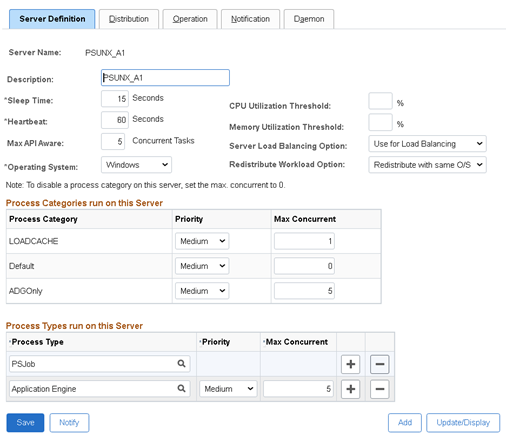
New process schedulers should be created for running ADG only jobs.  They will only be connected to the standby database.  The standby connection should be left blank.  All of the SQL updates made by the Process Scheduler processes will be handled by DML redirection.  You will need to have at least 2 so they do not become a single point of failure.
[Startup]
;=========================================================================
; Database Signon settings
;=========================================================================
DBName=FINADG
DBType=ORACLE
UserId=PSAPPS
UserPswd={V2}YoAQq7Ut4WBHJL89N9gv9E0AWwLaecGZ4qep
ConnectId=PEOPLE
ConnectPswd={V2}OlSYHuFMZa2c8uonfYkKk+3+APYvTU9N
StandbyDBName=
StandbyDBType=
StandbyUserId=
StandbyUserPswd=
These schedulers will ONLY run:
  • Processes in the new ADGOnly process category.  
  • A single LOADCACHE category process will be permitted.
  • The max concurrence of all other categories will be 0.
  • Other process types such as SQR might be needed if they are to be run on the ADG standby
They should not run master process scheduler processes. This process should only run schedulers connected to the primary database.
ADG Process Scheduler Configuration

Existing Process Schedulers

All process categories apply to all process schedulers.  The concurrency of the ADG category should be set to 0 on all other process schedulers to prevent it from running there.  These schedulers will remain connected to the primary database only.  They will not be connected to the secondary database.
[Startup]
;=========================================================================
; Database Signon settings
;=========================================================================
DBName=FINPRD
DBType=ORACLE
UserId=PSAPPS
UserPswd={V2}EcxeV3mit3GMT5kDfz/z+s0L9B1aUb6ix04f
ConnectId=PEOPLE
ConnectPswd={V2}NtXafW7hlcGY016bhazl2kqqvlSNYMK1
StandbyDBName=
StandbyDBType=
StandbyUserId=
StandbyUserPswd=

Process Definition

Normally, the processes that are to be run on ADG should be marked read-only and then they will be scheduled using the secondary connection.    However, Application Engine cannot be run in standalone PSAE mode via the second connection.  So, the ADG process schedulers are configured to connect directly to the ADG database via the primary connection.  Thus, the read-only flag has no effect.  Instead, all read-only processes should be moved to the ADGOnly category.

Configuration by SQL

It may be easier to update the process scheduler configuration by SQL
  • ADGOnly concurrency will be 0, or it will be the maximum API aware concurrency on ADG process schedulers.
  • PSQUERY, any read-only processes, and any processes in ADGOnly category, will all be marked as being both read-only and in the ADGOnly category.
update pslock 
set    version = version + 1
where  objecttypename IN('SYS','PPC')
/
update psversion
set    version = version + 1
where  objecttypename IN('SYS','PPC')
/
update  ps_servercategory c 
set     maxconcurrent = CASE WHEN servername like 'PSUNX_A%' 
                             THEN (SELECT s.maxapiaware FROM ps_serverdefn s 
                                   WHERE  s.servername = c.servername)
                             ELSE 0 END
where   prcscategory = 'ADGOnly'
/
update ps_serverdefn
set    version = (SELECT version from psversion where objecttypename = 'PPC')
,      lastupddttm = systimestamp
/
update ps_prcsdefn 
set    version = (SELECT version from psversion where objecttypename = 'PPC')
,      prcsreadonly = 1
,      prcscategory = 'ADGOnly'
,      lastupddttm = systimestamp
where  prcsreadonly = 1
or     prcscategory = 'ADGOnly'
or     prcsname = 'PSQUERY'
/
select prcstype, prcsname, prcscategory, prcsreadonly
from   ps_prcsdefn
where  prcsreadonly = 1
or     prcscategory = 'ADGOnly'
or     prcsname = 'PSQUERY'
/
select * from ps_servercategory
where prcscategory IN('ADGOnly')
order by 2,1
/
commit
/

Sample Output

PSOFT-FINADG>Select prcstype, prcsname, prcscategory, prcsreadonly
  2  From   ps_prcsdefn
  3  where  prcsreadonly = 1
  4  or     prcscategory = 'ADGOnly'
  5  or     prcsname = 'PSQUERY'
  6  /

PRCSTYPE                       PRCSNAME     PRCSCATEGORY                   P
------------------------------ ------------ ------------------------------ -
Application Engine             AEMINITEST   ADGOnly                        1
COBOL SQL                      PTPDBTST     ADGOnly                        1
SQR Report                     PTSQRTST     ADGOnly                        1
Application Engine             FB_GEN_EXTR  ADGOnly                        1
SQR Report                     XRFWIN       ADGOnly                        1
SQR Report                     SWPAUDIT     ADGOnly                        1
SQR Report                     SYSAUDIT     ADGOnly                        1
SQR Report                     XRFAPFL      ADGOnly                        1
SQR Report                     XRFAEPL      ADGOnly                        1
SQR Report                     XRFPGDZ      ADGOnly                        1
SQR Report                     DDDAUDIT     ADGOnly                        1
SQR Report                     XRFEVPC      ADGOnly                        1
SQR Report                     XRFFLPC      ADGOnly                        1
SQR Report                     XRFFLPN      ADGOnly                        1
SQR Report                     XRFFLRC      ADGOnly                        1
SQR Report                     XRFIELDS     ADGOnly                        1
SQR Report                     XRFMENU      ADGOnly                        1
SQR Report                     XRFPANEL     ADGOnly                        1
SQR Report                     XRFPCFL      ADGOnly                        1
SQR Report                     XRFPNPC      ADGOnly                        1
SQR Report                     XRFRCFL      ADGOnly                        1
SQR Report                     XRFRCPN      ADGOnly                        1
Application Engine             PSQUERY      ADGOnly                        1
Application Engine             PSCONQRS     ADGOnly                        1

SYSADM-FINADG>select * from ps_servercategory
  2  where prcscategory IN('ADGOnly')
  3  order by 2,1
  4  /

SERVERNA PRCSCATEGORY                   P MAXCONCURRENT
-------- ------------------------------ - -------------
…
PSNT     ADGOnly                        5             0
PSUNX    ADGOnly                        5             0
PSUNX_A1 ADGOnly                        5             5
…

PSQUERY Application Engine Amendment

If you have PS/Queries that reference a remote database via a database link then you may experience errors when you run them via the scheduled Application Engine process PSQUERY on an ADG database.
Using a database link, even if only for a query, starts a database transaction, and then you can't get DML redirect to work because it also starts a transaction.  However, if you already have a transaction open through DML redirect you can't start the transaction associated with the database link.  The two transactions become mutually exclusive.
PeopleTools 8.58.07 - Application Engine
Copyright (c) 1988-2021 Oracle and/or its affiliates.
All Rights Reserved

PeopleTools SQL Trace value: 159 (0x9f): /cs/psoft/cfg/FINPRD/appserv/prcs/FINPRDA1/log_output/AE_PSQUERY_xxxxxxxx/AE_PSQUERY_xxxxxxxx.trc
PeopleTools PeopleCode Trace value: 64 (0x40): /cs/psoft/cfg/FINPRD/appserv/prcs/FINPRDA1/log_output/AE_PSQUERY_xxxxxxxx/AE_PSQUERY_xxxxxxxx.trc

File: /vob/peopletools/src/pssys/qpm.cppSQL error. Stmt #: 8495  Error Position: 3055  Return: 16000 - ORA-16000: database or pluggable database open for read-only access 
Failed SQL stmt: SELECT …
<a query that references a remote database via a database link>Error in running query because of SQL Error, Code=16000, Message=ORA-16000: database or pluggable database open for read-only access  (50,380)

PeopleCode Exit(1) Abort invoked by Application at PSQUERY.MAIN.ExecQry. (108,543)

Process xxxxxxxx ABENDED at Step PSQUERY.MAIN.ExecQry (PeopleCode) -- RC = 16 (108,524)

Process %s ABENDED at Step %s.%s.%s (Action %s) -- RC = %s
So we need to close the transactions by making the PSQUERY application engine commit.  Application Engine steps explicitly commit after each step.  I have added an extra step added that does nothing, but Application Engine issues a commit

Disable Query Statistics

I have found that query statistics can cause a problem when the query is run on ADG.
PeopleTools 8.58.07 - Application Engine
Copyright (c) 1988-2021 Oracle and/or its affiliates.
All Rights Reserved

PeopleTools SQL Trace value: 159 (0x9f): /cs/psoft/cfg/FINPRD/appserv/prcs/FINPRDA2/log_output/AE_PSQUERY_19356674/AE_PSQUERY_19356674.trc

File: /vob/peopletools/src/pssys/qdmutil.cppSQL error. Stmt #: 4608  Error Position: 91  Return: 16397 - ORA-16397: statement redirection from Oracle Active Data Guard standby database to primary database failed 
Failed SQL stmt: SELECT EXECCOUNT, AVGEXECTIME, AVGFETCHTIME, LASTEXECDTTM, AVGNUMROWS, OPRID, QRYNAME FROM PSQRYSTATS WHERE OPRID = :1 AND QRYNAME = :2 FOR UPDATE OF EXECCOUNT
Application Engine program PSQUERY ended normally
They can be disabled in the PIA
  • Navigate to: PeopleTools, Utilities, Administration, Query Administration, 
  • Go to the last tab (Settings), 
  • Uncheck Run Query Statistics.

Enable Query Execution Logging

Query stats (logged in the table PSQRYSTATS) are not particularly useful as they only compute average metrics over a period that is not defined.  Instead, query execution logging (to the table PSQRYEXECLOG) is far more useful for performance analysis because you know who ran the query when it ran, and how many rows it retrieved.  It is enabled for individual queries.  It can be enabled across the board with the following SQL.
update pslock
set    version = version + 1
where  objecttypename IN('SYS','QDM')
/
update psversion
set    version = version + 1
where  objecttypename IN('SYS','QDM')
/
update psqrydefn
set    version = (SELECT version from psversion where objecttypename = 'QDM')
,      execlogging = 'Y'
,      lastupddttm = systimestamp
where  execlogging != 'Y'
/
commit
/

Tuesday, August 03, 2021

Alter SQL Profiles from Exact to Force Matching

You can use DBMS_SQLTUNE.ALTER_SQL_PROFILE to change the status, name, description, or category of a SQL profile, but you can't alter it from exact to force matching.  Instead, you would have to recreate it.  That is easy if you have the script that you used to create it in the first place.  There is another way.

Oracle support note How to Move SQL Profiles from One Database to Another (Including to Higher Versions) (Doc ID 457531.1) describes a process to export SQL profiles to a staging table that can be imported into another database.  This provides an opportunity to alter a profile by updating the data in the staging table.  There are two columns in the staging table that have to be updated.

  • SQLFLAGS must be updated from 0 (indicating an exact match profile) to 1 (indicating a force match profile)
  • SIGNATURE must be recalculated as a force matching signature using DBMS_SQLTUNE.SQLTEXT_TO_SIGNATURE.

Demonstration

I am going to create a small table with a unique index.  

CREATE TABLE t (a not null, b) AS 
SELECT rownum, ceil(sqrt(rownum)) FROM dual connect by level <= 100;
create unique index t_idx on t(a);
exec dbms_stats.gather_table_stats(user,'T');

ttitle off
select * from dba_sql_profiles where name like 'my%sql_profile%';
explain plan for SELECT * FROM t WHERE a = 42;
ttitle 'Default Execution plan without profiles (index scan)'
select * from table(dbms_xplan.display(null,null,'ADVANCED +ADAPTIVE -PROJECTION'));

Without any SQL profiles, when I query by the unique key I get a unique index scan.

Plan hash value: 2929955852

-------------------------------------------------------------------------------------
| Id  | Operation                   | Name  | Rows  | Bytes | Cost (%CPU)| Time     |
-------------------------------------------------------------------------------------
|   0 | SELECT STATEMENT            |       |     1 |     6 |     1   (0)| 00:00:01 |
|   1 |  TABLE ACCESS BY INDEX ROWID| T     |     1 |     6 |     1   (0)| 00:00:01 |
|*  2 |   INDEX UNIQUE SCAN         | T_IDX |     1 |       |     0   (0)| 00:00:01 |
-------------------------------------------------------------------------------------

Now I am going to create two SQL profiles.  I have deliberately put the same SQL text into both SQL Profiles.

  • my_sql_profile is exact matching
  • my_sql_profile_force is force matching.

DECLARE
signature INTEGER;
sql_txt CLOB;
h       SYS.SQLPROF_ATTR;
BEGIN
sql_txt := q'[
SELECT * FROM t WHERE a = 54
]';
h := SYS.SQLPROF_ATTR(
q'[BEGIN_OUTLINE_DATA]',
q'[IGNORE_OPTIM_EMBEDDED_HINTS]',
q'[FULL(@"SEL$1" "T"@"SEL$1")]',
q'[END_OUTLINE_DATA]');
signature := DBMS_SQLTUNE.SQLTEXT_TO_SIGNATURE(sql_txt);
DBMS_SQLTUNE.IMPORT_SQL_PROFILE (
sql_text    => sql_txt,
profile     => h,
name        => 'my_sql_profile',
category    => 'DEFAULT',
validate    => TRUE,
replace     => TRUE,
force_match => FALSE 
);
END;
/

DECLARE
signature INTEGER;
sql_txt CLOB;
h       SYS.SQLPROF_ATTR;
BEGIN
sql_txt := q'[
SELECT * FROM t WHERE a = 54
]';
h := SYS.SQLPROF_ATTR(
q'[BEGIN_OUTLINE_DATA]',
q'[IGNORE_OPTIM_EMBEDDED_HINTS]',
q'[FULL(@"SEL$1" "T"@"SEL$1")]',
q'[END_OUTLINE_DATA]');
signature := DBMS_SQLTUNE.SQLTEXT_TO_SIGNATURE(sql_txt);
DBMS_SQLTUNE.IMPORT_SQL_PROFILE (
sql_text    => sql_txt,
profile     => h,
name        => 'my_sql_profile_force',
category    => 'DEFAULT',
validate    => TRUE,
replace     => TRUE,
force_match => TRUE 
);
END;
/
ttitle off
select * from dba_sql_profiles where name like 'my%sql_profile%';

NAME                           CATEGORY               SIGNATURE SQL_TEXT                                                                         CREATED
------------------------------ ---------- --------------------- -------------------------------------------------------------------------------- ------------------------------
LAST_MODIFIED                  DESCRIPTION          TYPE    STATUS   FOR    TASK_ID TASK_EXEC_NAME       TASK_OBJ_ID TASK_FND_ID TASK_REC_ID TASK_CON_DBID
------------------------------ -------------------- ------- -------- --- ---------- -------------------- ----------- ----------- ----------- -------------
my_sql_profile                 DEFAULT      9394869341287877934                                                                                  31-JUL-21 10.47.34.243454
                                                                SELECT * FROM t WHERE a = 54
31-JUL-21 10.47.34.000000                           MANUAL  ENABLED  NO

my_sql_profile_force           DEFAULT     11431056000319719221                                                                                  31-JUL-21 10.47.34.502721
                                                                SELECT * FROM t WHERE a = 54
31-JUL-21 10.47.34.000000                           MANUAL  ENABLED  YES

The force match profile works if the literal value is different from that in the profiles.

explain plan for SELECT * FROM t WHERE a = 42;
select * from table(dbms_xplan.display(null,null,'ADVANCED +ADAPTIVE -PROJECTION'));

Plan hash value: 1601196873
--------------------------------------------------------------------------
| Id  | Operation         | Name | Rows  | Bytes | Cost (%CPU)| Time     |
--------------------------------------------------------------------------
|   0 | SELECT STATEMENT  |      |     1 |     6 |     3   (0)| 00:00:01 |
|*  1 |  TABLE ACCESS FULL| T    |     1 |     6 |     3   (0)| 00:00:01 |
--------------------------------------------------------------------------
…
Predicate Information (identified by operation id):
---------------------------------------------------

   1 - filter("A"=42)

Hint Report (identified by operation id / Query Block Name / Object Alias):
Total hints for statement: 2
---------------------------------------------------------------------------

   0 -  STATEMENT
           -  IGNORE_OPTIM_EMBEDDED_HINTS

   1 -  SEL$1 / T@SEL$1
           -  FULL(@"SEL$1" "T"@"SEL$1")

Note
-----
   - SQL profile "my_sql_profile_force" used for this statement

The exact match profile takes precedence of the force match profile.

explain plan for SELECT * FROM t WHERE a = 54;
select * from table(dbms_xplan.display(null,null,'ADVANCED +ADAPTIVE -PROJECTION'));

Plan hash value: 1601196873

--------------------------------------------------------------------------
| Id  | Operation         | Name | Rows  | Bytes | Cost (%CPU)| Time     |
--------------------------------------------------------------------------
|   0 | SELECT STATEMENT  |      |     1 |     6 |     3   (0)| 00:00:01 |
|*  1 |  TABLE ACCESS FULL| T    |     1 |     6 |     3   (0)| 00:00:01 |
--------------------------------------------------------------------------
…
Predicate Information (identified by operation id):
---------------------------------------------------

   1 - filter("A"=54)

Hint Report (identified by operation id / Query Block Name / Object Alias):
Total hints for statement: 2
---------------------------------------------------------------------------

   0 -  STATEMENT
           -  IGNORE_OPTIM_EMBEDDED_HINTS

   1 -  SEL$1 / T@SEL$1
           -  FULL(@"SEL$1" "T"@"SEL$1")

Note
-----
   - SQL profile "my_sql_profile" used for this statement

I am now going to follow the process to export the SQL Profiles to a staging table, and subsequently reimport them.

exec DBMS_SQLTUNE.CREATE_STGTAB_SQLPROF(table_name=>'STAGE',schema_name=>user);
exec DBMS_SQLTUNE.PACK_STGTAB_SQLPROF (staging_table_name =>'STAGE',profile_name=>'my_sql_profile');
exec DBMS_SQLTUNE.PACK_STGTAB_SQLPROF (staging_table_name =>'STAGE',profile_name=>'my_sql_profile_force');

There is a row in the staging table for each profile and you can see the differences between them.

select signature, sql_handle, obj_name, obj_type, sql_text, sqlflags from STAGE;

            SIGNATURE SQL_HANDLE                     OBJ_NAME
--------------------- ------------------------------ ---------------------------------------------------------------------
OBJ_TYPE                       SQL_TEXT                                                                           SQLFLAGS
------------------------------ -------------------------------------------------------------------------------- ----------
  9394869341287877934 SQL_826147e3c6ac0d2e           my_sql_profile
SQL_PROFILE                                                                                                              0
                               SELECT * FROM t WHERE a = 54

 11431056000319719221 SQL_9ea344de32a78735           my_sql_profile_force
SQL_PROFILE                                                                                                              1
                               SELECT * FROM t WHERE a = 54

I will update the staging table using this PL/SQL loop (because SQL doesn't recognise TRUE as a boolean constant).

DECLARE
  l_sig INTEGER;
BEGIN
  FOR i IN (
    SELECT rowid, stage.* FROM stage WHERE sqlflags = 0 FOR UPDATE
  ) LOOP
    l_sig := dbms_sqltune.sqltext_to_signature(i.sql_text,TRUE);
    UPDATE stage
    SET    signature = l_sig
    ,      sqlflags = 1
    WHERE  sqlflags = 0
    AND    rowid = i.rowid;
  END LOOP;
END;
/

And now the profiles look the same.

select signature, sql_handle, obj_name, obj_type, sql_text, sqlflags from STAGE;

            SIGNATURE SQL_HANDLE                     OBJ_NAME
--------------------- ------------------------------ ---------------------------------------------------------------------
OBJ_TYPE                       SQL_TEXT                                                                           SQLFLAGS
------------------------------ -------------------------------------------------------------------------------- ----------
 11431056000319719221 SQL_826147e3c6ac0d2e           my_sql_profile
SQL_PROFILE                                                                                                              1
                               SELECT * FROM t WHERE a = 54

 11431056000319719221 SQL_9ea344de32a78735           my_sql_profile_force
SQL_PROFILE                                                                                                              1
                               SELECT * FROM t WHERE a = 54

But I can't just reimport my_sql_profile from the staging replacing the one in the database because I will get ORA-13841: SQL profile named my_sql_profile already exists for a different signature/category pair. To avoid this error I must either drop the profile or rename it.  

I am going to rename the existing exact matching profile, and also disable it and move it to another category to stop it from matching my statement in preference to the force matching profile (see previous post Clashing SQL Profiles - Exact Matching Profiles Take Precedence Over Force Matching Profiles), and thus I can go back to it later if needed.

I will drop my example force matching profile.  I no longer need that.

Then, I can reimport the profile from the staging table.

exec dbms_sqltune.alter_sql_profile(name=>'my_sql_profile', attribute_name=>'NAME',value=>'my_old_sql_profile');
exec dbms_sqltune.alter_sql_profile(name=>'my_old_sql_profile', attribute_name=>'CATEGORY',value=>'DO_NOT_USE');
exec dbms_sqltune.alter_sql_profile(name=>'my_old_sql_profile', attribute_name=>'STATUS',value=>'DISABLED');
exec dbms_sqltune.drop_sql_profile('my_sql_profile_force',TRUE);
EXEC DBMS_SQLTUNE.UNPACK_STGTAB_SQLPROF(profile_name => 'my_sql_profile', replace => TRUE, staging_table_name => 'STAGE');

I can see in the SQL profile table that my SQL profile is now force matching, and it has a different signature to the old one that is exact matching.

ttitle off
select * from dba_sql_profiles where name like 'my%sql_profile%';

NAME                           CATEGORY               SIGNATURE SQL_TEXT                                                                         CREATED
------------------------------ ---------- --------------------- -------------------------------------------------------------------------------- ------------------------------
LAST_MODIFIED                  DESCRIPTION          TYPE    STATUS   FOR    TASK_ID TASK_EXEC_NAME       TASK_OBJ_ID TASK_FND_ID TASK_REC_ID TASK_CON_DBID
------------------------------ -------------------- ------- -------- --- ---------- -------------------- ----------- ----------- ----------- -------------
my_old_sql_profile             DO_NOT_USE   9394869341287877934                                                                                  31-JUL-21 10.54.58.694037
                                                                SELECT * FROM t WHERE a = 54
31-JUL-21 10.55.00.000000                           MANUAL  DISABLED NO

my_sql_profile                 DEFAULT     11431056000319719221                                                                                  31-JUL-21 10.55.01.005377
                                                                SELECT * FROM t WHERE a = 54
31-JUL-21 10.55.01.000000                           MANUAL  ENABLED  YES

Both my queries now match the new force matching version of the profile.

explain plan for SELECT * FROM t WHERE a = 42;
ttitle 'Execution plan with force match profile (full scan)'
select * from table(dbms_xplan.display(null,null,'ADVANCED +ADAPTIVE -PROJECTION'));

Plan hash value: 1601196873

--------------------------------------------------------------------------
| Id  | Operation         | Name | Rows  | Bytes | Cost (%CPU)| Time     |
--------------------------------------------------------------------------
|   0 | SELECT STATEMENT  |      |     1 |     6 |     3   (0)| 00:00:01 |
|*  1 |  TABLE ACCESS FULL| T    |     1 |     6 |     3   (0)| 00:00:01 |
--------------------------------------------------------------------------
…
Predicate Information (identified by operation id):
---------------------------------------------------

   1 - filter("A"=42)

Hint Report (identified by operation id / Query Block Name / Object Alias):
Total hints for statement: 2
---------------------------------------------------------------------------

   0 -  STATEMENT
           -  IGNORE_OPTIM_EMBEDDED_HINTS

   1 -  SEL$1 / T@SEL$1
           -  FULL(@"SEL$1" "T"@"SEL$1")

Note
-----
   - SQL profile "my_sql_profile" used for this statement

explain plan for SELECT * FROM t WHERE a = 54;
select * from table(dbms_xplan.display(null,null,'ADVANCED +ADAPTIVE -PROJECTION'));

Plan hash value: 1601196873

--------------------------------------------------------------------------
| Id  | Operation         | Name | Rows  | Bytes | Cost (%CPU)| Time     |
--------------------------------------------------------------------------
|   0 | SELECT STATEMENT  |      |     1 |     6 |     3   (0)| 00:00:01 |
|*  1 |  TABLE ACCESS FULL| T    |     1 |     6 |     3   (0)| 00:00:01 |
--------------------------------------------------------------------------

…
Predicate Information (identified by operation id):
---------------------------------------------------

   1 - filter("A"=54)

Hint Report (identified by operation id / Query Block Name / Object Alias):
Total hints for statement: 2
---------------------------------------------------------------------------

   0 -  STATEMENT
           -  IGNORE_OPTIM_EMBEDDED_HINTS

   1 -  SEL$1 / T@SEL$1
           -  FULL(@"SEL$1" "T"@"SEL$1")

Note
-----
   - SQL profile "my_sql_profile" used for this statement
The script used for this demonstration is available on GitHub