Tuesday, December 19, 2023

Using Attribute Clustering to Improve Compression, Response Time and CPU Consumption: 1. Introduction

Attribute Clustering reorders data in a table so that similar data values are clustered together.  This can improve both basic and columnar compression, resulting in better response time and lower CPU consumption.

This is the first of a two-part blog post.

  1. Introduction
  2. Example and Test Results

Use Case

I am working on a Financials system running on an engineered system.  It runs a daily batch of GL reports on summary ledgers that have unindexed materialized views.  The materialized views are also hybrid column compressed (HCC) to reduce their size and improve reporting performance.  

We also put the materialized views into the In-Memory store.  Initially, we used 'free' base-level In-Memory and worked within the 16Gb/instance limit.  Having moved to Exadata Cloud@Customer, we can use the fully licensed version of In-Memory.

Now I have introduced Attribute Clustering for the materialized views.

Attribute Clustering

Attribute Clustering
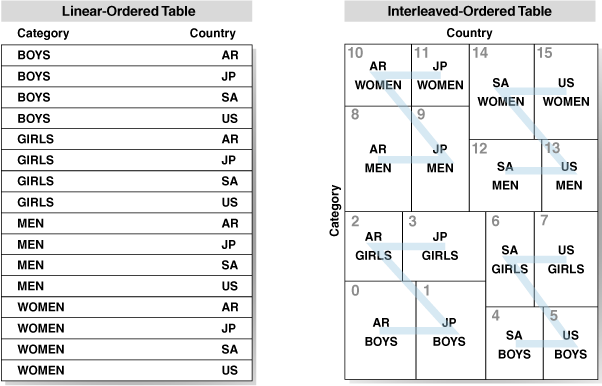
Attribute Clustering has been available on Enterprise Edition since Oracle 12.1.0.2.  Data is clustered in close physical proximity according to certain columns.  Linear Ordering stores the data according to the order of the specified clustering columns.  Interleaved Ordering uses a Z-order curve to cluster data in multiple dimensions (this graphic is from Oracle's documentation).

The GL reports have multiple combinations of different predicates. Therefore, as recommended by Oracle, we used interleaved ordering.  Linear ordering is not suitable in this case because there is no single suitable order for each table.  Linear ordering also caused the runtime of the materialized view refresh to extend much more than interleaved ordering as it has to sort the data.

We have not introduced Zone Maps.  That is to say that after testing, we removed them.  Zone maps can be thought of as a coarse index of the zones in the attribute clustering, and would normally be expected to improve the access of the data.  You can see them being used in the execution plans to access the table both in the tablespace and in the In-Memory store.  However, our application dynamically generates a lot of SQL and therefore performs a lot of SQL parse.  We found that the additional work to process the zone map significantly degraded performance.

Attribute Clustering is not enforced for every DML operation. It only affects direct-path insert operations, data movement, or table creation. It is easy to implement it for segments that are already HCC, which also relies on direct-path operations.  The materialized views were created to introduce HCC, hence they are refreshed in non-atomic mode which truncates and repopulates them in direct-path mode.  Thus attribute clustering specified on the materialized views will be implemented as they refresh.

Historical, and therefore static, partitions in the ledger tables are marked for HCC, and we schedule an online rebuild to compress them.  Now, that will also apply attribute clustering.  This process could be automated with Automatic Storage Compression.

Compression

Simply by storing similar data values together, we obtained better compression from HCC.  The tables underlying the materialized views were smaller.  

In-Memory also uses columnar compression.  Attribute clustering produced a reduction in the size of segments in the In-Memory store.  If we were still working within the constraints of Base-Level In-Memory, we would have been able to store more segments in In-Memory.

We are using attribute clustering not to directly improve data access, but to harness a secondary effect, that of improved compression.  We are seeing a reduction in the runtime of the reports.  Most of the database time is already spent on the CPU (as most of the fact tables are in In-Memory), so this translates to a reduction in CPU consumption.  We can consider running more reports concurrently to complete the batch earlier.  We can also consider reducing the number of CPUs and therefore reduce cloud subscription costs.

The second part of this blog will show an example test script and results.

Monday, November 27, 2023

Database Constraints Enforced but not Validated for New Data Now, but Not Existing Data

Recently, while discussing a problem, somebody said to me 'I would like to make this column NOT NULL to stop [this problem] from occurring, but first I would need to go back and fix all the historical data'. 
In Oracle, a constraint that is enabled will apply during DML, so as you insert or update the data, the constraint is applied to the rows that are being updated. Only when a constraint is validated, does the database check that all the data in the table conforms to the constraint.  
If you create a constraint that is enforced, but not validated, you may be able to prevent a problem from getting worse while you fix the data you already have.

A Demonstration 

I will create a table with a unique constraint and two other columns that are NOT NULL.  I put some data in the tables.  Column B is null for some of the rows, but not for others.
create table t (a number, b number, c number, constraint t_pk primary key(A));

insert into t (a,b)
select level, CASE WHEN MOD(level,2)=1 then 1 end --B is null on alternate rows
from dual connect by level<=10;

select * from t;

         A          B          C
---------- ---------- ----------
         1          1           
         2                      
         3          1           
         4                      
         5          1           
         6                      
         7          1           
         8                      
         9          1           
        10                      

10 rows selected.
I would like to make B a NOT NULL column (to stop the application from writing an invalid value to the database), but cannot because I already have some invalid values in the database.
SQL> alter table t modify b not null ;

ORA-02296: cannot enable (SCOTT.) - null values found
02296. 00000 - "cannot enable (%s.%s) - null values found"
*Cause:    an alter table enable constraint failed because the table
           contains values that do not satisfy the constraint.
*Action:   Obvious
However, I can create the constraint with the NOVALIDATE option.
SQL> alter table t modify b not null novalidate;

Table T altered.

SQL> select constraint_name, search_condition_vc from user_constraints where table_name = 'T';

CONSTRAINT_NAME SEARCH_CONDITION_VC                                         
--------------- ------------------------------------------------------------
T_PK                                                                        
SYS_C00221684   "B" IS NOT NULL
Note that at the moment column B is not described as NOT NULL because although the constraint is enforced, it has not been validated.
SQL> desc t
Name Null?    Type   
---- -------- ------ 
A    NOT NULL NUMBER 
B             NUMBER 
C             NUMBER
If I try to add more rows where some of the data in column B is null, the constraint prevents it.
SQL> insert into t (a,b)
  2  select level+10, CASE WHEN MOD(level,2)=1 then 1 end 
  3  from dual connect by level<=10;

ORA-01400: cannot insert NULL into ("SCOTT"."T"."B")
I can set B column to a NOT NULL value, but I cannot set it back to null.
SQL> update t set b = 2 where a=2;

1 row updated.

SQL> update t set b = NULL where a=2;

ORA-01407: cannot update ("SCOTT"."T"."B") to NULL
I can successfully update a different column on a row where B is null and therefore does not meet the constraint.  I do not get an error because I have not updated it.  
SQL> SQL> update t set c = a;

10 rows updated.
Eventually, I will want to validate the constraint so that I know that B has a not null value in all the rows. But I can't do it while there are still some null values
SQL> select * from t;

         A          B          C
---------- ---------- ----------
         1          1          1
         2          2          2
         3          1          3
         4                     4
         5          1          5
         6                     6
         7          1          7
         8                     8
         9          1          9
        10                    10

SQL> DECLARE
  2    l_sql CLOB;
  3  BEGIN
  4    FOR I IN (select * from user_constraints where table_name = 'T' AND constraint_type ='C' 
  5              and validated != 'VALIDATED' and search_condition_vc = '"B" IS NOT NULL') LOOP
  6      l_sql := 'alter table '||i.table_name||' modify constraint '||i.constraint_name||' VALIDATE';
  7      dbms_output.put_line(l_sql);
  8      EXECUTE IMMEDIATE l_sql;
  9    END LOOP;
 10  END;
 11  /
alter table T modify constraint SYS_C00221684 VALIDATE

ORA-02293: cannot validate (SCOTT.SYS_C00221684) - check constraint violated
ORA-06512: at line 7
02293. 00000 - "cannot validate (%s.%s) - check constraint violated"
*Cause:    an alter table operation tried to validate a check constraint to
           populated table that had nocomplying values.
*Action:   Obvious
First I have to fix the data, and then I can validate the constraint
SQL> UPDATE t set b=a where b is null;

4 rows updated.

SQL> REM now validate the constraint
SQL> BEGIN
  2    FOR I IN (select * from user_constraints where table_name = 'T' AND constraint_type ='C' 
  3              and validated != 'VALIDATED' and search_condition_vc = '"B" IS NOT NULL') LOOP
  4      EXECUTE IMMEDIATE 'alter table '||i.table_name||' modify constraint '||i.constraint_name||' VALIDATE';
  5    END LOOP;
  6  END;
  7  /

PL/SQL procedure successfully completed.
Only now that the new constraint has been validated is the column described as NOT NULL.
SQL> desc t
Name Null?    Type   
---- -------- ------ 
A    NOT NULL NUMBER 
B    NOT NULL NUMBER 
C             NUMBER

Friday, November 10, 2023

Prioritising Scheduled Processes by Operator ID/Run Control

Batch processing is like opera (and baseball) - "It ain't over till the fat lady sings".  Users care about when it starts and when it finishes.  If the last process finishes earlier, then that is an improvement in performance. 

This note describes a method of additionally prioritising processes queued to run on the process scheduler in PeopleSoft by their requesting operator ID and run control.  Where processing consists of more instances of the same process than can run concurrently, it can be used to make the process scheduler run longer-running processes before shorter-running processes that were scheduled earlier, thus completing batch processing earlier.

In PeopleSoft, without customisation, it is only possible to prioritise processes queued to run on the process scheduler by assigning a priority to the process definition or their process category.  Higher priority processes are selected to be run in preference to lower priorities.  Otherwise, processes are run in the order of the time at which they are requested to run.

Problem Statement

During an overnight batch, many nVision report books are scheduled to run on the Windows process schedulers by one of several specific batch operator IDs.  Many more reports are scheduled than can run concurrently, so some execute while others queue.  Inevitably, the reports have widely varying execution times.  The maximum concurrency of the nVision report book (RPTBOOK) process definition has been set, and the Oracle database resource manager has also been configured, to prevent too many of these processes from overloading the database.

CPU Utilisation of BatchThis chart shows the database activity when the batch runs.  We often see what has come to be called the 'long tail' while we wait for just a few long-running processes to complete.


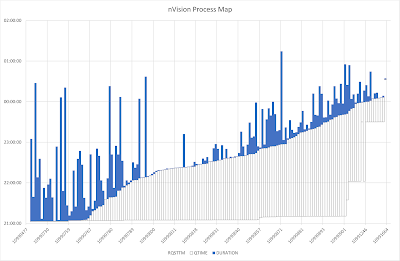
The next chart shows the processing time of each nVision report process.  The blue bars run from when the started to when it ended, ordered by start time.   The clear boxes below run from the time when it was requested to when it started, thus showing the period for which the processes were queued on a process scheduler, but were blocked because the maximum number of processes were already processing.
Process Map (without prioritisation)
All these processes run with the same priority because they are the same process definition.  Some long-running jobs execute earlier in the batch simply because they were scheduled earlier, but others that started later, run on beyond the end of the batch.  
It would be better if the longest-running processes were executed earlier, irrespective of the order in which they were requested.  Thus the shorter processes can run later as slots on the scheduler become free, and thus all processes should finished both closer together and earlier.
There is nothing delivered in the PeopleSoft process scheduler configuration that will let you assign different priorities to different executions of the same process.  In PeopleSoft, only three priorities are defined PRCSPRIORITY (1=Low, 5=Medium, 9=High) on the process definition and the server category.  These priorities are transferred to the process request queue (PSPRCSQUE.PRCSPRTY).  
If we could put our own priority into that column we could control the priority of the request.  

Solution

Introduce a database trigger that fires on insert into PSPRCSQUE and sets a priority specified on a new metadata table.  PRCSPRTY is not validated by PeopleSoft, and therefore any value can be specified.  
The files are available in a Github repository davidkurtz/psprcspty. The exact metadata will vary with the use case and requirements, but I provided some examples of how it might be generated.

Metadata Table: PS_XX_GFCPRCSPRTY

We need a table that will hold the priority for each combination of process type, process name, operation ID, and run control ID.  A corresponding record should be created using the Application Designer project in the GitHub repository.

create table sysadm.ps_xx_gfcprcsprty
(prcstype  VARCHAR2(30 CHAR) NOT NULL
,prcsname  VARCHAR2(12 CHAR) NOT NULL
,oprid     VARCHAR2(30 CHAR) NOT NULL
,runcntlid VARCHAR2(30 CHAR) NOT NULL
,prcsprty  NUMBER NOT NULL
--------------------optional columns
,avg_duration NUMBER NOT NULL
,med_duration NUMBER NOT NULL
,max_duration NUMBER NOT NULL
,cum_duration NUMBER NOT NULL
,tot_duration NUMBER NOT NULL
,num_samples  NUMBER NOT NULL
) tablespace ptapp;

create unique index sysadm.ps_xx_gfcprcsprty
on sysadm.ps_xx_gfcprcsprty(prcstype, prcsname, oprid, runcntlid) 
tablespace psindex compress 3;

Trigger Before Insert into PSPRCSQUE

As processes are scheduled in PeopleSoft, a row is inserted into the process scheduler queue table PSPRCSQUE.  A trigger will be created on this table that fires after the insert.  It will look for a matching row on the metadata table, PS_XX_GFCPRCSPRTY for the combination of process type, process name, operator ID, and run control ID.  If found, the trigger will assign the specified priority to the process request.  Otherwise, it will take no action.

CREATE OR REPLACE TRIGGER sysadm.psprcsque_set_prcsprty
BEFORE INSERT ON sysadm.psprcsque
FOR EACH ROW
WHEN (new.prcsname = 'RPTBOOK')
DECLARE
  l_prcsprty NUMBER;
BEGIN
  SELECT prcsprty
  INTO   l_prcsprty
  FROM   ps_xx_gfcprcsprty
  WHERE  prcstype = :new.prcstype
  AND    prcsname = :new.prcsname
  AND    oprid = :new.oprid
  AND    runcntlid = :new.runcntlid;
 
  :new.prcsprty := l_prcsprty;
EXCEPTION
  WHEN no_data_found THEN NULL;
  WHEN others THEN NULL;
END;
/
show errors

In this case, I am only assigning priorities to RPTBOOK processes, so I have added a when clause to the trigger so that it only fires for RPTBOOK process requests.  This can either be changed for other processes or removed entirely.

Priority Metadata

How the priorities should be defined will depend on the specific use case.  In some cases, you may choose to create a set of metadata that remains unchanged.

In this case, the objective is that the processes to take the longest to run should be executed first.  Therefore, I decided that the priority of each nVision report book process (by operator ID and run control ID) will be determined by the median elapsed execution time in the last two months.  The priorities are allocated such that the sum of the median execution times for each priority will be as even as possible.  

I have created a PL/SQL procedure GFCPRCSPRIORITY to truncate the metadata table and then repopulate it using a query on the process scheduler table (although, an Application Engine program could have been written to do this instead).  Some details of that query will vary with the exact use case. The procedure is executed daily, thus providing a feedback loop so if the run time varies over time, or new processes are added to the batch, it will be reflected in the priorities.

REM nvision_prioritisation_by_cumulative_runtime.sql

set serveroutput on
create or replace procedure sysadm.gfcprcspriority as
  PRAGMA AUTONOMOUS_TRANSACTION; --to prevent truncate in this procedure affecting calling session
  l_hist INTEGER := 61 ; --consider nVision processes going back this many days
begin
  EXECUTE IMMEDIATE 'truncate table ps_xx_gfcprcsprty';

--populate priorty table with known nVision processes 
insert into ps_xx_gfcprcsprty
with r as (
select r.prcstype, r.prcsname, r.prcsinstance, r.oprid, r.runcntlid, r.runstatus, r.servernamerun
, CAST(r.rqstdttm AS DATE) rqstdttm
, CAST(r.begindttm AS DATE) begindttm
, CAST(r.enddttm AS DATE) enddttm
from t, psprcsrqst r
  inner join ps.psdbowner p on r.dbname = p.dbname -- in test exclude any history copied from another database
where r.prcstype like 'nVision%' --limit to nVision processes
and r.prcsname like 'RPTBOOK' -- limit to report books
and r.enddttm>r.begindttm  --it must have run to completion
and r.oprid IN('NVISION','NVISION2','NVISION3','NVISION4')  --limit to overnight batch operator IDs
and r.begindttm >= TRUNC(SYSDATE)+.5-l_hist --consider process going back l_hist days from midday today
and r.runstatus = '9' --limit to successful processes
and r.begindttm BETWEEN ROUND(r.begindttm)-5/24 AND ROUND(r.begindttm)+5/24 --started between 7pm and 5am
), x as (
select r.*, CEIL((enddttm-begindttm)*1440) duration -–rounded up to the next minute
from r
), y as (
select prcstype, prcsname, oprid, runcntlid
, AVG(duration) avg_duration
, MEDIAN(CEIL(duration)) med_duration 
, MAX(duration) max_duration
, SUM(CEIL(duration)) sum_duration
, COUNT(*) num_samples
from x
group by prcstype, prcsname, oprid, runcntlid
), z as (
select y.* 
, sum(med_duration) over (order by med_duration rows between unbounded preceding and current row) cum_duration 
, sum(med_duration) over () tot_duration
from y
)
select prcstype, prcsname, oprid, runcntlid 
, avg_duration, med_duration, max_duration, cum_duration, tot_duration, num_samples
--, CEIL(LEAST(tot_duration,cum_duration)/tot_duration*3)*4-3 prcsprty  --3 priorities
, CEIL(LEAST(tot_duration,cum_duration)/tot_duration*9) prcsprty  --9 priorities
--, DENSE_RANK() OVER (order by med_duration) prcsprty --unlimited priorities
from z
order by prcsprty, cum_duration;

  dbms_output.put_line(sql%rowcount||' rows inserted');
  commit;

end gfcprcspriority;
/
show errors
In testing, I found that using just the 3 delivered levels of priority was not sufficiently granular to prioritise the jobs adequately, so I chose to use 9 levels (1 to 9).  The process priority on PRCSQUE is not validated, so I can use any value.  I also found I could just rank the processes from 1 to n by duration, and that would also work.

It is possible to create additional priority levels for process categories (see also More Process Priority Levels for the Process Scheduler), but that still only works for prioritising different processes over each other.

Metadata

This is the metadata produced on a test system by the above query.  It will vary depending on what has been run recently, and how it performed.  There are more, shorter processes in the lower priority groups, and fewer, longer processes in the higher priority groups.  

PRCSTYPE                       PRCSNAME     OPRID        RUNCNTLID                        PRCSPRTY
------------------------------ ------------ ------------ ------------------------------ ----------
…
nVision-ReportBook             RPTBOOK      NVISION2     NVS_RPTBK_XXX1                          1
nVision-ReportBook             RPTBOOK      NVISION2     NVS_RPTBK_XXX3                          1
nVision-ReportBook             RPTBOOK      NVISION2     NVS_RPTBK_LLLL8                         1
…
nVision-ReportBook             RPTBOOK      NVISION2     NVS_RPTBK_LLLL9                         2
nVision-ReportBook             RPTBOOK      NVISION      NVS_RPTBOOK_STAT8                       2
nVision-ReportBook             RPTBOOK      NVISION      NVS_RPTBOOK_STAT1                       2
…
nVision-ReportBook             RPTBOOK      NVISION2     NVS_RPTBK_TEMPXX                        6
nVision-ReportBook             RPTBOOK      NVISION      NVS_RPTBOOK_3                           6
nVision-ReportBook             RPTBOOK      NVISION      NVS_RPTBOOK_17                          6
nVision-ReportBook             RPTBOOK      NVISION      NVS_RPTBOOK_STAT4                       7
nVision-ReportBook             RPTBOOK      NVISION      NVS_RPTBOOK_28                          7
nVision-ReportBook             RPTBOOK      NVISION2     NVS_RPTBK_INCXXX                        8
nVision-ReportBook             RPTBOOK      NVISION2     NVS_RPTBK_MORYYY1                       8
nVision-ReportBook             RPTBOOK      NVISION      NVS_RPTBOOK_24                          9
nVision-ReportBook             RPTBOOK      NVISION      NVS_RPTBOOK_16                          9

A Test Script

This test script inserts some dummy rows into PSPRCSQUE to check whether a priority is assigned by the trigger. The insert is then rolled back.

INSERT INTO psprcsque (prcsinstance, prcstype, prcsname, oprid, runcntlid)
VALUES (-42, 'nVision-ReportBook', 'RPTBOOK', 'NVISION','NVS_RPTBOOK_17');
INSERT INTO psprcsque (prcsinstance, prcstype, prcsname, oprid, runcntlid)
VALUES (-43, 'nVision-ReportBook', 'RPTBOOK', 'NVISION','NVS_RPTBOOK_STAT1');
select prcsinstance, prcstype, prcsname, oprid, runcntlid, prcsprty from psprcsque where prcsinstance IN(-42,-43);
rollback;

You can see that it was successful because priorities 2 and 7 were assigned.

PRCSINSTANCE PRCSTYPE                       PRCSNAME     OPRID        RUNCNTLID                        PRCSPRTY
------------ ------------------------------ ------------ ------------ ------------------------------ ----------
         -43 nVision-ReportBook             RPTBOOK      NVISION      NVS_RPTBOOK_STAT1                       2
         -42 nVision-ReportBook             RPTBOOK      NVISION      NVS_RPTBOOK_17                          7

Monitoring Script

This query in script process_prioritisation_by_cumulative_runtime_report.sql reports on the average, median, and cumulative median execution time for each nVision process that ran to success during the overnight processing window as calculated by the package GFCPRCSPRIORITY and stored in PS_XX_GFCPRCSPRTY.  It also compares that to the priority and last actual run time for that process.

Example Output

                                                                                                      Cum.                                            
                                                                        Average   Median            Median    Total         Last Run   Actual                   
                                                                  Prcs Duration Duration Duration Duration Duration     Num  Process Duration Duration Duration Priorty
PRCSTYPE             PRCSNAME   OPRID        RUNCNTLID            Prty   (mins)   (mins)   (mins)   (mins)   (mins) Samples Priority   (mins)    Diff    % Diff    Diff
-------------------- ---------- ------------ -------------------- ---- -------- -------- -------- -------- -------- ------- -------- -------- -------- -------- -------
nVision-ReportBook   RPTBOOK    NVISION      NVS_RPTBOOK_4           9    90.65      131      209     1834     1997      23        6      189       58       44       3 
nVision-ReportBook   RPTBOOK    NVISION      NVS_RPTBOOK_16          9   159.17      163      209     1997     1997      23        9      177       14        9       0

nVision-ReportBook   RPTBOOK    NVISION      NVS_RPTBOOK_14          8    89.26      127      215     1703     1997      23        6      167       40       31       2
nVision-ReportBook   RPTBOOK    NVISION      NVS_RPTBOOK_24          8   115.87      117      165     1576     1997      23        9      144       27       23      -1

nVision-ReportBook   RPTBOOK    NVISION2     NVS_RPTBK_MORYYY1       7    93.13       85      165     1459     1997      23        8      158       73       86      -1
nVision-ReportBook   RPTBOOK    NVISION      NVS_RPTBOOK_28          7    88.30       80      172     1374     1997      23        8      108       28       35      -1

nVision-ReportBook   RPTBOOK    NVISION2     NVS_RPTBK_INCXXX        6    83.61       79      149     1294     1997      18        7      118       39       49      -1
nVision-ReportBook   RPTBOOK    NVISION      NVS_RPTBOOK_17          6    70.96       69      105     1143     1997      23        7       81       12       17      -1
nVision-ReportBook   RPTBOOK    NVISION      NVS_RPTBOOK_STAT4       6    68.00       72       81     1215     1997       8        7       81        9       13      -1

nVision-ReportBook   RPTBOOK    NVISION2     NVS_RPTBK_MMMMMM        5    52.45       46      119      914     1997      22        5       91       46      100       0
nVision-ReportBook   RPTBOOK    NVISION2     NVS_RPTBK_TEMPXX        5    50.48       49      104      963     1997      23        5       94       45       92       0
nVision-ReportBook   RPTBOOK    NVISION      NVS_RPTBOOK_3           5    55.52       55       99     1018     1997      23        6       79       24       44      -1
nVision-ReportBook   RPTBOOK    NVISION      NVS_RPTBOOK_1           5    47.70       56      137     1074     1997      23        4       56        0        0       1
…

Monitoring Query

The query in prcsmap.sql is used to produce the data for a map of the processes, showing request time, time spent queuing, and time spent executing.  It is the basis of the second chart above. I normally run this in SQL Developer and export the data as an Excel workbook.  There is an example spreadsheet in the Github repository.

9 levels of Prioritisation

With prioritisation, we can see that the long-running jobs with higher priority ran earlier.  

We can also see that some of the higher-priority jobs that are scheduled later are running earlier than those scheduled earlier, and are thus finishing earlier.

There is no longer any tail of processing.  Instead, load drops quickly at the end of the batch, and the batch as a whole finishes earlier.


Wednesday, June 21, 2023

The Goal


One of my favourite books on Oracle performance, "Optimizing Oracle Performance" by Cary Millsap & Jeff Holt, introduced me to "The Goal" by Eli Goldratt and Jeff Cox.  
The Goal is all about performance, without being anything to do with computers.  It is a story of a man who has to save his manufacturing plant from closure by making it profitable.  The language is about manufacturing, but it applies to any system of processes, including any software application and your Oracle (or any other) database!  
Recently, I was checking a quote from it, and I ended up reading it again.  It is 20 years since I first read these two books.  They completely changed how I thought about performance.  Both remain as valid today as they were then.  
It is good to be reminded of these fundamental principles every now and then.
"So this is the goal: To make money by increasing net profit, while simultaneously increasing return on investment, and simultaneously increasing cash flow." 
"There are three measurements which express the goal of making money ... throughput, inventory and operational expense"
"Throughput is the rate at which the system generates money through sales.
Inventory is all the money that the system has invested in purchasing things which it intends to sell.
Operational expense is all the money the system spends in order to turn inventory into throughput."
"A plant in which everyone is working all the time is very inefficient."
"A bottleneck is any resource whose capacity is equal to or less than the demand placed upon it.  And a non-bottleneck is any resource whose capacity is greater than the demand placed on it."
"What does lost time on a bottleneck mean?  It means you have lost throughput."
"The capacity of a plant is equal to the capacity of its bottlenecks."
"A system of local optimums is not an optimum system at all; it is a very inefficient system."
"An hour lost at a bottleneck is an hour lost for the entire system.
An hour saved at a non-bottleneck is worthless."
"1. IDENTIFY the system's constraint(s).
2. Decide how to EXPLOIT the system's constraint(s).
3. SUBORDINATE everything else to the above decision.
4. ELEVATE the system's constraint(s).
5. WARNING!!!! If in the previous steps, a constraint has been broken, go back to step 1, but do not allow INERTIA to cause a system's constraint."
"I started to have a very good guideline; if it comes from cost accounting it must be wrong."

Performance optimisation is sometimes viewed as a black art.  It is not.  Instead, like detection, it "is, or ought to be, an exact science, and should be treated in the same cold and unemotional manner".  

Thursday, June 15, 2023

More Bang for your Buck in the Cloud with Resource Manager

Much of the cost in database IT is tied to the number of CPUs.  Oracle database licencing is priced per CPU.  The dominant factor in determining your cloud subscription cost is also CPU, although, disk, memory, and network can also be a cost factor. 

That incentivises you to minimise your CPU.  I believe it is inevitable that cloud systems will be configured with fewer CPUs and it will become more common to see them running either close to or beyond the point of having 0% idle CPU.  In fact, I'll go further:  

In the cloud, if your system is not constrained by CPU, at least some of the time, you are probably spending too much money on renting too many CPUs.

What happens to an Oracle database when it runs out of CPU?

The resource manager has been part of the Oracle database since 8i, but in my experience, it is rarely used.

Every process has to demand CPU and if necessary wait on the CPU run queue.  If you don't have a resource manager plan, then all the Oracle processes will have equal priority on that queue.  The resource manager will not intervene.  

However, not all processes are created equal.  Instead, the users of an application will consider some things more important or urgent than others.  Some processes are on a critical path to delivering something by a deadline, while others can wait.  That implies a hierarchy of priority.  A resource manager plan allocates CPU to higher priority processes over low priority within the constraint of a minimum guaranteed CPU allocation and can restrict the degree of parallelism.  

Note that "By default, all predefined maintenance windows use the resource plan DEFAULT_MAINTENANCE_PLAN".  When you introduce your own resource manager plan you don't need to alter the predefined windows.

A resource manager plan that reflects the business priorities can enable a system to meet its objectives with fewer resources, particularly CPU resources.  In a cloud system, using fewer resources, particularly CPU resources, will tend to save money on cloud subscription costs.

A User Story

Let me tell you about a PeopleSoft Financials system at an insurance company.  Like all insurance companies, they like to slice and dice their General Ledger in lots of different ways and produce lots of reports every night.

Data flows through the system from GL transaction processing via summary ledgers on which materialized views are built and then reports are run

Transactions -> Post to Ledger -> Summary Ledgers -> Materialised Views -> Reports

A fundamentally important thing this company did was to provide a quantitative definition of acceptable performance.  

  • "GL reports must be finished by the time continental Europe starts work at 8am CET / 2am EST"
  • "Without making the system unavailable to Asia/Pac users" 
  • "At night (in the US), some other things can wait, but need to be available at the start of the US working day."

They were running on a two-node RAC database on an engineered system, on-premises.  When the overnight GL batch was designed and configured on the old hardware, parallelism was increased until it consumed the entire box.

The system has now moved to an Exadata cloud-at-customer machine.  It is still a two-node RAC cluster.  We have a choice of up to 10 OCPUs (20 virtual CPUs) per node.  During testing, we progressively reduced the CPU count until we could only just meet that target.  Every time we reduce the CPU by 1 OCPU on each of the two nodes, we reduced the cost of the cloud subscription by approximately US$2000/month.

Implicit in that statement of adequate performance is also a statement of what is important to the business.  We started to create a hierarchy of processes.  

  • If the business is waiting on the output of a process then that is a high-priority process that is guaranteed a high proportion of available CPU. 
  • If a process is finished before the business needs it then it has a lower priority.  For example, a set of processes was building reporting tables that were not needed until the start of the US working day, so their start time was pushed back, and they were put in a lower prior consumer group that also restricted their degree of parallelism. 

Sometimes, it can be hard to determine whether the users are waiting and whether the performance is adequate, but usually, they will tell you!  However, with an overnight batch process, it is straightforward.  If it is outside office hours, then the users aren't waiting for it, but it needs to be there when they come into the office in the morning.

Like so many physical things in life, nearly everything that happens in computing involves putting a task on a queue and waiting for it to come back.  Most computer systems are chains of inbound and outbound queues.  On the way other requests for resources may be invoked that also have to be queued.  Ultimately, every system is bound by its resources.  On a computer that is CPU, memory, disk, and network.  A critical process whose performance is degraded, because it is not getting enough of the right kind of resource, becomes a bottleneck.

"Time lost at a bottleneck is lost across the system." 

One of my favourite books on Oracle performance is Optimizing Oracle Performance by Cary Millsap & Jeff Holt.  It introduced me to another book, The Goal by Eli Goldratt and Jeff Cox.  Its central theme is the nature of bottlenecks, otherwise called constraints.   "A bottleneck is any resource whose capacity is equal to or less than the demand placed upon it."

It is all about performance, without being anything to do with computers.  It is a Socratic case study of how to implement the 5-step strategy dubbed "The Theory of Constraints" to improve the performance of a system.  The five steps are set out plainly and then again in another book by Goldratt "What is This Thing Called Theory of Constraints and How Should It Be Implemented?"

  • IDENTIFY the system's constraint(s).
  • Decide how to EXPLOIT the system's constraint(s).
  • SUBORDINATE everything else to the above decision.
  • ELEVATE the system's constraint(s).
  • WARNING!!!! If in the previous steps, a constraint has been broken, go back to step 1, but do not allow INERTIA to cause a system's constraint.
  • In the factory in The Goal, the goal is to increase throughput while simultaneously reducing inventory and operating expense.

    In the cloud, the goal is to increase system throughput while simultaneously reducing response time and the cost of resources.

    The Resource Manager Plan

    The hierarchy of processes then determines who should get access to the CPU in preference to whom.  It translates into a database resource manager plan.  This is the 4th of Goldratt's 5 steps.  The higher priority processes are on the critical processing path get precedence for CPU so that they can make process.  The lower-priority processes may have to wait for CPU so they don't impede higher-priority processes (this is the 3rd step).

    The resource plan also manages the degree of parallelism that can be used within each consumer group, so that we don't run out of parallel query servers.  Higher-priority processes may not have a high PQ limit because there are more processes that run concurrently.  Processes are mostly allocated to consumer groups through mappings of module, action, and program name, some are mapped explicitly using triggers.

    Over the years, the resource manager plan for this particular system has gone through three main design iterations.  The 4 lowest-priority consumer groups were added to restrict the consumption of these groups when the higher groups were active.

    Priority1st Iteration2nd Iteration3rd IterationDescription of Consumer Group
    1PSFT_GROUPGeneral group for PeopleSoft application and batch processes.
    PQ limit = ½ of CPU_COUNT (3rd iteration)
    2HIGH_GROUPFor weekly stats collection process of 2 multi-billion row tables (LEDGER and JRNL_LN).
    PQ limit = 2x CPU_COUNT
    3SUML_GROUPProcess that refresh summary ledger tables, and MVs on summary ledgers.
    PQ limit = ¾ of CPU_COUNT
    4NVISION
    _GROUP
    nVision General Ledger reporting processes.
    PQ limit ≈ 3/8 of CPU_COUNT
    5GLXX_GROUPProcesses that build GLXX reporting tables, and do some reporting. Parallelism disabled. Run concurrently with nVision, but more important to complete GL reporting.
    PQ limit = 1. No parallelism
    6PSQUERY
    _GROUP
    NVSRUN
    _GROUP
    Other queries submitted via PeopleSoft ad-hoc query tool and ad-hoc nVision
    PQ limit = 3 - 4
    7ESSBASE
    _GROUP
    Essbase processes.
    PQ limit = 2 - 4
    8LOW_GROUP,
    LOW_LIMITED
    _GROUP
    Other Processes.
    Also deals with an Oracle bug that causes AQ$_PLSQL_NTFN% jobs to run continuously consuming CPU.
    Actual/Estimated Time Limit

    This approach has certainly prevented the processes in GLXX_GROUP, ad-hoc queries in the PSQUERY_GROUP, and other processes in the LOW_GROUP from taking CPU away from critical processes in PSFT_GROUP, NVISION_GROUP and SUML_GROUP.  We also adjusted the configuration of the application to reduce the number of processes that can run concurrently.

    What if we decide to change the number of CPUs 

    When this system ran on an on-premises machine we had a single resource plan because the number of CPUs was fixed.  

    Now it has moved to the cloud, we can choose how many CPUs to pay for.  Performance was tested with various configurations.  Consequently, we have created several different resource plans for different numbers of CPUs with different PQ limits.  When we change the number of CPUs we just specify the corresponding resource manager plan.  

    Some other database parameters have been set to lower non-default values to restrict overall SQL parallelism and the number of concurrent processes on the database job scheduler. These are also changed in line with the number of CPUs.

    alter system set RESOURCE_MANAGER_PLAN=PSFT_PLAN_CPU8 scope=both sid='*';
    alter system set JOB_QUEUE_PROCESSES=8 scope=both sid='*';
    alter system set PARALLEL_MAX_SERVERS=40 scope=both sid='*';
    alter system set PARALLEL_SERVERS_TARGET=40 scope=both sid='*';

    It is possible that in the future we might automate changing the number of CPUs by schedule.  It is then easy to switch resource manager plans by simply setting an initialisation parameter.  

    At the moment, we have one plan in force at all times.  It is also possible to change plans on a schedule using scheduler windows, and you can still intervene manually by opening a window.

    TL;DR In the Cloud, Performance is Instrumented as Cost

    You can have as much CPU and performance as you are willing to pay for.

    By configuring the resource manager to prioritise CPU allocation to high-priority processes, ones for which users are waiting, over lower-priority ones, a system can achieve its performance objectives while consuming fewer resources.